
Ever wished you could plug in a security camera or office phone with just one cable for both internet and power? That’s the magic of Power over Ethernet (PoE). It’s a clever technology that sends electrical power right alongside data through a standard Ethernet cable, completely eliminating the need for a separate power cord and a nearby wall outlet.
Unpacking Power Over Ethernet
A great way to think about Power over Ethernet is to compare it to a modern USB-C cable. Just as a single USB-C can charge your laptop, transfer files, and connect to a monitor all at once, a PoE-enabled Ethernet cable can power a device while also giving it a stable network connection. This elegant, one-cable solution is a true game-changer for installing network equipment.
This technology fundamentally simplifies how we set up devices. By sending safe, low-voltage DC power through the very same twisted-pair wiring that carries data, PoE opens up a world of possibilities. You can finally place equipment exactly where it needs to go, not just where a power outlet happens to be.
Before we dive deeper, here's a quick summary of the core concepts.
PoE At A Glance Key Takeaways
| Concept | What It Means | Primary Benefit |
|---|---|---|
| Power & Data in One | A single Ethernet cable delivers both electrical power and a data connection. | Eliminates the need for separate power cords and AC outlets. |
| Low-Voltage DC | Sends safe, direct current power that won't damage equipment or pose a shock risk. | Safe to handle and install without needing a licensed electrician. |
| Smart Power Delivery | PoE devices "talk" to each other to determine the correct amount of power to send. | Prevents overloading and protects non-PoE devices from damage. |
| Centralized Power | Power for multiple devices originates from a central source, like a PoE switch. | Easy to manage and connect to a backup power supply (UPS). |
Now, let's explore the real-world advantages of this single-cable approach.
The Core Benefits of a Single Cable
The biggest win here is flexibility. You can install devices in tricky spots like attics, ceilings, or high on exterior walls without the expense and hassle of calling an electrician to run new power lines. This makes it an ideal choice for both home and business network expansions.
The key advantages really speak for themselves:
- Simplified Installation: Cutting the number of cables in half makes any setup cleaner, faster, and much less cluttered.
- Cost Savings: You can skip the cost of installing new electrical outlets and wiring, which can significantly lower your project budget.
- Increased Flexibility: Devices can be placed in the best locations for performance and coverage, rather than being stuck next to the nearest power source.
- Centralized Power Management: Power can be controlled from a single point, like a network switch in a closet, making it simple to hook everything up to a backup power supply.
PoE technology isn't just about convenience; it’s about creating smarter, more efficient, and cost-effective environments. By merging power and data into one stream, it removes a major barrier to modern network expansion.
The growth of this technology in Canada really underscores its practical value. In 2023, the Canadian PoE chipset market hit USD 90.1 million in revenue, a figure that’s expected to nearly double by 2030. For businesses and homeowners, installing PoE can cut cabling costs by up to 50% compared to traditional methods. You can read more about this growing market on grandviewresearch.com.
Ultimately, getting a handle on PoE is the first step toward building a more adaptable and reliable network. You can learn more about this in our complete network setup and optimization guide.
How PoE Safely Sends Power and Data
So, how does Power over Ethernet actually work its magic? It’s a clever bit of engineering. At its heart, PoE sends a low-voltage DC current down the very same Ethernet cable that’s carrying your data.
A standard Ethernet cable has four twisted pairs of copper wires inside. Older network standards often only used two of these pairs for data, leaving the other two free. PoE technology was initially designed to run power over these spare pairs. Modern PoE can also send power and data on the same wires, which is even more efficient.
This whole process relies on two types of devices working together. The device that provides the power, like a special network switch or an injector, is called the Power Sourcing Equipment (PSE). On the other end, the gadget receiving the power—say, a security camera or VoIP phone—is known as a Powered Device (PD).
But the real genius of PoE is its built-in safety protocol. You can’t just accidentally plug in your laptop and fry it. There's a crucial communication step that happens first.
The PoE Handshake: A Built-In Safety Check
The secret sauce is a process known as the “PoE handshake.” You can think of it as a quick, polite conversation between the power source (PSE) and whatever you just plugged in.
Before sending any real power, the PSE sends a tiny, harmless electrical signal down the cable. It’s essentially asking, “Hello? Is there a PoE device on the other end?”
This handshake confirms two critical things:
- Is the connected device actually designed to receive power via Ethernet?
- If so, how much power does it need to function properly?
A PoE-compatible device (the PD) will respond with a specific electrical signature. Only after the PSE receives this correct signature will it deliver the full, required voltage. If you plug in a non-PoE device like a printer or a desktop computer, it won't have the right signature. The PSE will simply recognize this, shrug, and treat the connection as a normal, data-only port. No power sent, no damage done. It’s this automated safety check that makes the technology so incredibly versatile and safe to use.
This diagram shows just how much cleaner a PoE setup is compared to traditional wiring.
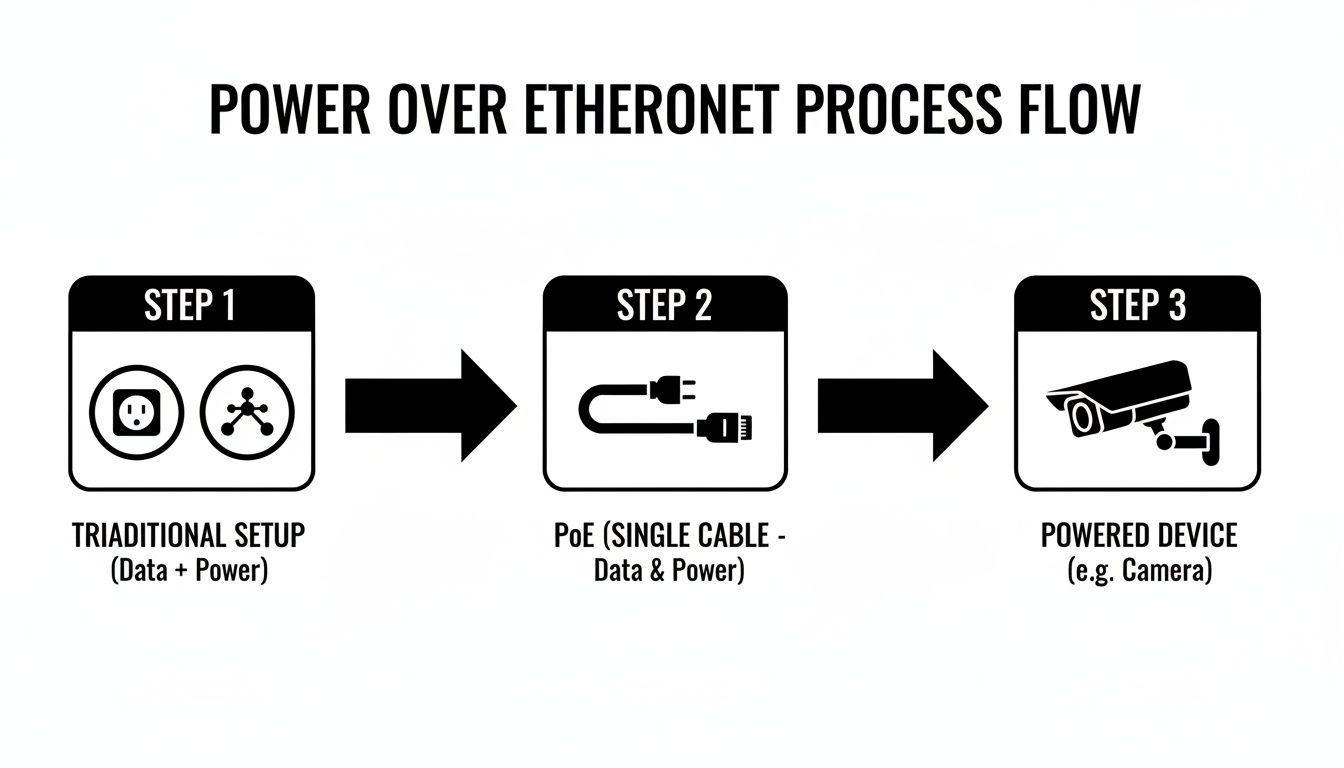
As you can see, what once required separate cables for power and data is now handled by a single, efficient Ethernet cable, dramatically simplifying installation.
Won't The Power Interfere With The Data?
It's a common question, but thankfully, the answer is no. The power and data signals are able to coexist peacefully on the same cable because they operate at very different frequencies. It's a bit like having two different radio stations broadcasting at the same time—you can tune into one without hearing the other. The twisted-pair design of Ethernet cables also does an excellent job of cancelling out any potential electromagnetic interference.
This intelligent power negotiation is why you can mix and match PoE and non-PoE devices on the same network switch without a second thought. The system is designed from the ground up to be backwards-compatible and safe, automatically figuring out what each connected device needs.
For businesses and homeowners, knowing how this works provides real peace of mind. Whether you're thinking about a new IP camera system or a complete office network overhaul, it's reassuring to know your equipment is protected.
For more complex jobs, getting the underlying wiring right is crucial. To see how a professional approach ensures everything works perfectly from day one, take a look at our guide on structured cabling in Hamilton. A solid network infrastructure is the foundation for reliability and helps prevent many of the common frustrations we see in our work providing computer & laptop repairs Hamilton residents trust.
Understanding The Different PoE Standards
Not all Power over Ethernet is created equal. To make sure a security camera has enough juice to move its motors or a high-speed access point performs flawlessly, the industry relies on a set of official standards. Think of them like different grades of fuel for a car—each one delivers a different level of power for different kinds of performance.
These standards, governed by the Institute of Electrical and Electronics Engineers (IEEE), have been updated over the years to keep up with the power demands of modern devices. This evolution ensures there's a perfect PoE fit for everything from a basic office phone to a sophisticated building access system. Getting your head around these differences is the first step in planning a network that's both stable and efficient.
Knowing which standard you need helps you avoid overspending on overpowered gear or, worse, underpowering critical devices and causing them to fail. When your network gets complicated, getting advice from experts in computer & laptop repairs Hamilton can make sure your setup is reliable and cost-effective right from the get-go.
The Original PoE Standard: 802.3af
It all started with IEEE 802.3af. This was the original standard that first made it possible to send power down an Ethernet cable. It was a game-changer, allowing devices to get up to 15.4 watts of power right from the source.
Of course, a little bit of power gets lost along the cable, so the device at the other end is guaranteed to receive at least 12.95 watts. That’s plenty for many common, low-power gadgets.
This standard is a great fit for devices like:
- VoIP phones: Your standard office desk phone without a fancy colour screen or video features.
- Simple security cameras: Fixed cameras that just point and shoot, with no need to pan, tilt, or zoom.
- Basic wireless access points: Entry-level Wi-Fi points designed for smaller spaces.
PoE+: The More Powerful 802.3at Standard
As technology moved forward, network devices started getting thirstier for power. This led to the creation of IEEE 802.3at, which most of us know as PoE+ (or PoE Plus). This update basically doubled the available power.
PoE+ provides up to 30 watts of power from the source, guaranteeing the device at the end of the line gets a minimum of 25.5 watts. This major power boost unlocked the potential for a whole new class of more demanding equipment. It’s also backwards-compatible, so you can safely plug an older, less power-hungry PoE device into a PoE+ port.
The arrival of PoE+ was a huge deal. It gave us the power needed to make more advanced network devices mainstream, like security cameras with motors and access points with multiple radios, which are now common in most businesses.
PoE++: The High-Power 802.3bt Standard
The latest and most powerful standard is IEEE 802.3bt, which you’ll often hear called PoE++ or 4PPoE (which stands for 4-Pair Power over Ethernet). This high-octane version comes in two flavours: Type 3 and Type 4.
- Type 3 can deliver up to 60 watts from the source (51W at the device).
- Type 4 pushes the limit even further, supplying up to 100 watts from the source (71W at the device).
This massive power budget is what makes it possible to run things like small computers, complex pan-tilt-zoom (PTZ) security cameras, smart lighting systems, and even some digital signs—all over a single Ethernet cable.
To help you keep track, here’s a quick breakdown of how the standards stack up against each other.
Comparison Of IEEE PoE Standards
This table compares the key PoE standards to help you understand their power delivery capabilities and where they're typically used.
| Standard | IEEE Name | Max Power Per Port | Common Devices |
|---|---|---|---|
| PoE | 802.3af | 15.4W | Basic VoIP phones, static security cameras, simple access points. |
| PoE+ | 802.3at | 30W | Pan-tilt-zoom (PTZ) cameras, video IP phones, more advanced access points. |
| PoE++ | 802.3bt | 60W – 100W | Laptops, small TVs, high-performance access points, building management systems. |
Choosing the right standard ensures your devices get the stable power they need to perform reliably.
Real-World Uses For PoE Technology
This is where the theory behind Power over Ethernet gets interesting. All the technical standards and power classes are great, but what does it actually do for you? The real magic of PoE is how it simplifies tricky installations for homes and businesses, turning what used to be a complicated wiring job into a clean, single-cable solution.
From securing your property to boosting office productivity, PoE's practicality is its biggest asset. It lets you put devices exactly where they need to go, not just where a power outlet happens to be. Think about mounting a security camera on a distant shed or placing a Wi-Fi access point high on a ceiling for the best coverage—PoE makes these jobs simple without calling an electrician.

IP Security and Access Control
One of the most common places you'll find PoE at work is in advanced CCTV systems. Security cameras are a perfect match for this technology because they often need to be installed in awkward spots—think high on exterior walls, along rooflines, or down long corridors where there are no outlets in sight. With PoE, one Ethernet cable is all you need to get a camera powered up and connected to the network.
The same logic applies to modern access control systems, including:
- Keycard readers at office doors.
- Video doorbells for both homes and commercial buildings.
- Intercom systems that need both power and a network link.
By cutting the wiring requirements in half, PoE makes deploying a comprehensive security system much faster and more cost-effective. You can learn more about how we use this technology in our guide to security camera systems.
The single-cable setup doesn't just save money on installation; it also builds a more resilient system. Because all the power comes from a central PoE switch, you can plug that switch into an Uninterruptible Power Supply (UPS). This keeps your cameras, locks, and alarms running smoothly even if the power goes out.
Streamlining Office and Home Networks
In any office, PoE is a game-changer for decluttering desks. Voice over IP (VoIP) phones are the classic example. Instead of juggling a separate power adapter and a network cable for every phone, a single PoE cable does both jobs, leading to a much tidier and more professional workspace.
Wireless Access Points (WAPs) are another device that benefits hugely from PoE. For the best Wi-Fi signal, you need to mount WAPs in central, elevated spots, like on a ceiling. PoE makes this a breeze, allowing you to install them in the optimal location without having to run new electrical wiring. The result is strong, reliable Wi-Fi coverage across your entire space.
Emerging Smart Building Applications
PoE isn't just for cameras and phones anymore. As the technology has evolved, its applications have expanded right into the world of smart buildings. The latest PoE++ standards deliver enough power to run devices like smart LED lighting systems, interactive digital signs, and even some point-of-sale terminals. This radically simplifies building management by reducing the dependence on traditional high-voltage electrical circuits.
Here in Canada, PoE is quickly becoming a go-to for smart infrastructure projects, especially in sectors like healthcare and education. It's been shown to simplify installations and reduce network failure points by 25-30%. For instance, some schools in the Greater Hamilton Area have adopted PoE for interactive whiteboards and classroom cameras, cutting their maintenance costs by an estimated 35% thanks to centralized power management.
Choosing the Right PoE Equipment for Your Needs
Now that you have a good handle on what Power over Ethernet is and what it’s used for, it's time to pick the right hardware. When you’re ready to bring PoE into your network, you essentially have two ways to supply power: a PoE injector or a PoE switch. The best choice really comes down to the size of your project, your budget, and what you see yourself needing down the road.
Picking the wrong one can mean spending more than you need to or ending up with a system that can’t grow with you. Let’s walk through the key differences so you can decide which path makes the most sense, whether you're just plugging in one camera or building out a whole new network.
PoE Injectors: The Simple, Scalpel Approach
A PoE injector is a small, no-fuss device built for one job: adding power to a single Ethernet cable. Think of it as a smart adapter. You run a standard Ethernet cable from your non-PoE router or switch into the injector, and another cable runs from the injector to your PoE-powered device. Simple as that.
It's the perfect solution for a couple of specific situations:
- Powering a Single Device: If you just need to power up one IP camera or a single VoIP phone, an injector is the most direct and budget-friendly way to get it done.
- Adding to an Existing Network: Already have a perfectly good network switch that just happens to lack PoE? An injector lets you add that one powered device without having to replace your main hardware.
A PoE injector is a targeted, cost-effective tool for small-scale needs. It’s ideal for adding one or two powered devices to an existing setup without a major overhaul.
PoE Switches: The Integrated Powerhouse
A PoE switch, on the other hand, is a network switch that has the power-sourcing technology built right into its ports. This single piece of equipment manages both data and power for multiple devices, which results in a much cleaner, more manageable, and scalable system.
This is definitely the way to go for larger or growing networks. If you’re planning to install a handful of IP cameras, several wireless access points, or a full set of VoIP phones, a PoE switch is the smarter long-term investment. It centralizes all your power management, which simplifies troubleshooting and makes it a breeze to hook your entire system up to a backup power supply.
While the initial cost is higher, the scalability and tidiness it brings are huge wins. For larger setups, getting advice on the right switch for your needs is a smart move, and a topic we often cover during computer & laptop repairs Hamilton consultations.
PoE is also branching out into new territory like smart lighting, and this integration is really starting to change commercial setups across Canada. For our clients in Hamilton, PoE lighting is a natural fit with our networking services. It allows for smart office designs that can reduce installation complexity by 40% and trim operational costs. You can find more about this growing market on fortunebusinessinsights.com.
If you're planning to install wireless access points, you can learn more about our access point installation services to make sure you get the best possible coverage.
When to Call a Professional for PoE Installation
While Power over Ethernet makes adding devices to your network much simpler, that simplicity can be deceptive. A successful, long-lasting PoE setup requires a good bit of planning and a solid understanding of how it all works together.
What starts as a simple DIY project can quickly get complicated, leading to anything from spotty performance to fried equipment if you're not careful.
When Professional Help Is a Must
Some situations are just better left to the pros. One of the most common missteps we see is miscalculating the total power budget for the network. If your PoE switch can't pump out enough wattage for all your cameras, phones, and access points, you'll be pulling your hair out trying to figure out why devices are randomly dropping off the network.
Using the wrong type or quality of Ethernet cable is another classic mistake. High-power devices need the right cabling, not just for performance but for safety, too.
Running new network lines through walls, ceilings, and across an entire office is definitely a job for an experienced technician. The same goes for troubleshooting those really stubborn connectivity issues that just don't make sense. For big projects, or even just for your own peace of mind, getting an expert on-site is the best way to make sure your network is safe, stable, and ready for whatever you throw at it.
A professional installation isn't just about plugging things in. It's about building a rock-solid foundation for your network—one that works perfectly today and can easily grow with you tomorrow without needing a complete do-over.
Bringing in an expert ensures every piece of the puzzle, from the switch to the cable to the device itself, is the right fit. For a closer look at what's involved, check out our guide on professional PoE installation services in Hamilton. Our team provides the expert computer & laptop repairs Hamilton businesses and homeowners rely on for a high-performance network they can count on.
Got Questions About PoE? We've Got Answers.
As we wrap up, it's natural to have a few lingering questions. Let's tackle some of the most common ones we hear from people just getting started with Power over Ethernet.
Is It Safe To Plug A Laptop Into A PoE Port?
Absolutely. You can plug a non-PoE device, like your laptop or a desktop computer, into a PoE port without any fear of frying it.
Modern PoE systems are smart. Before sending any power, the switch or injector performs a quick "handshake" to see if the device on the other end actually needs power. If it doesn't detect a PoE-compatible device, it simply acts like a normal data-only port. No power is sent, and no damage is done.
What Is The Maximum Cable Distance For PoE?
The golden rule for both standard Ethernet and PoE is a maximum distance of 100 metres (or 328 feet).
This limit isn't actually about the power, but about maintaining the integrity of the data signal over that length. Go any further, and you risk a weak, unreliable connection. If you need to span a larger area, PoE extenders can be used to boost the signal and power for another 100-metre stretch.
Understanding this 100-metre rule is crucial for planning reliable network layouts, especially in larger homes or office spaces. For complex runs, consulting a professional ensures you won't suffer from signal loss or power drop-offs that can cause devices to fail.
Do I Need Special Ethernet Cables For PoE?
For low-power devices, maybe not. But for anything more demanding, using the right cable is key. A standard Category 5e (Cat5e) cable can often handle basic, low-wattage PoE just fine.
However, once you get into higher-power standards like PoE+ and PoE++, upgrading your cabling is a must. We strongly recommend using Category 6 (Cat6) or better. These cables have thicker copper conductors that handle heat better and deliver power and data more reliably, preventing performance issues. If you're unsure about your cabling, the team handling your computer & laptop repairs Hamilton can provide expert advice.
Planning a PoE setup and want to ensure it’s done right? Contact Klimka Computer Solutions for professional installation, network optimization, and support. Learn more about our services.
One Response
[…] like IP cameras, sensors, and access points. Familiarity with complementary technologies like Power over Ethernet (PoE) standards underscores why maintaining a high-quality, uninterrupted connection is so […]