
If you've ever typed "mac pro a1278" into a search bar, you're looking at a true workhorse of a laptop. It's easy to get confused by the name, but this isn't a big desktop Mac Pro. Instead, A1278 refers to the classic 13-inch unibody MacBook Pro, a fan favourite built between mid-2009 and mid-2012. Its rock-solid build and surprising upgrade potential have given it a legendary reputation.
Understanding the Classic MacBook Pro A1278
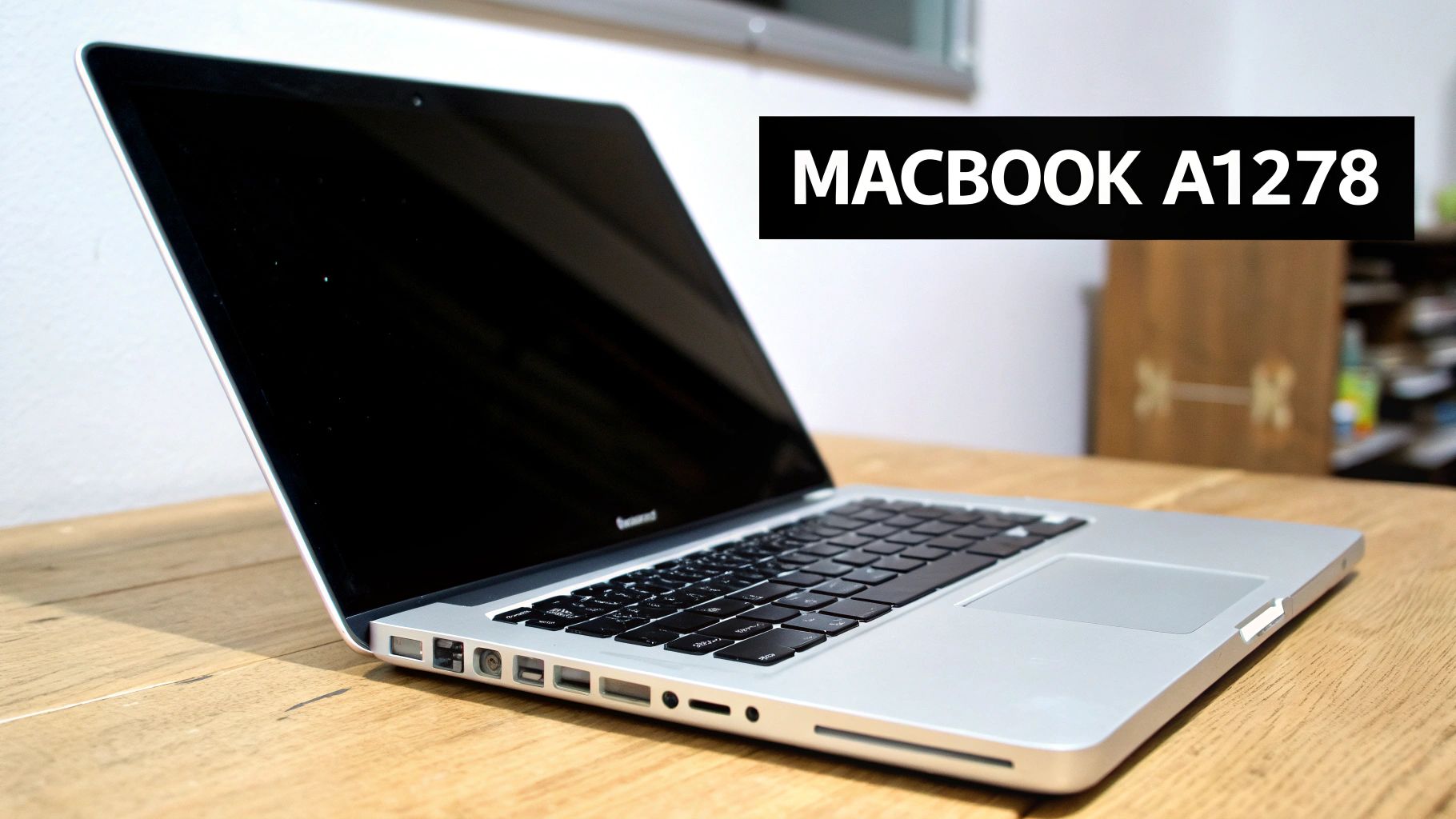
The MacBook Pro A1278 isn't just one specific model; it's a whole family of laptops that all share that same iconic aluminum unibody shell. Think of "A1278" as the chassis number—the blueprint Apple used for several years. While the tough exterior and user-friendly layout stayed the same, each new model year brought tweaks to the internals, like faster processors and better graphics.
This consistency is a huge part of why people still love these machines. Modern MacBooks have almost everything soldered directly onto the main board, but the A1278 comes from a different era. Most of its key parts are modular, which makes it a dream for anyone in the Hamilton area looking to do repairs or upgrades.
Why This Model Remains A Local Favourite
You don't have to look far in Hamilton, Stoney Creek, or Southern Ontario to spot a MacBook Pro A1278. They’re still regulars in coffee shops, on university campuses, and in small business offices. That’s not just nostalgia—it’s a sign of a practical design that delivers incredible value.
For a lot of people in Hamilton, the A1278 hits that perfect sweet spot between performance and repairability. It’s a reliable machine that you can bring up to modern standards for a fraction of what a new laptop costs, making it a seriously smart and sustainable choice.
One of the biggest game-changers is swapping out the old, slow spinning hard drive for a speedy solid-state drive (SSD). It’s amazing what a difference that one upgrade makes. We even have a guide on https://klimkacomputersolutions.com/laptop-hard-drives/ that walks through how much of an impact it can have. Throw in some extra RAM, and a ten-year-old MacBook can feel surprisingly snappy again.
Identifying Your Specific A1278 Model
If you have one of these classics, it's worth figuring out its exact age and model year. There are some great guides that explain how to tell how old your computer is. Knowing your specific model is key to understanding its full capabilities and what your best upgrade options are.
To make things a little easier, here's a quick reference table for the most common A1278 models we see.
MacBook Pro A1278 Model Year Identifiers
| Model Year | Identifier | Processor Type | Initial OS |
|---|---|---|---|
| Mid-2009 | MacBookPro5,5 | Core 2 Duo | Mac OS X 10.5.7 |
| Mid-2010 | MacBookPro7,1 | Core 2 Duo | Mac OS X 10.6.3 |
| Early 2011 | MacBookPro8,1 | Core i5/i7 (Sandy Bridge) | Mac OS X 10.6.6 |
| Late 2011 | MacBookPro8,1 | Core i5/i7 (Sandy Bridge) | Mac OS X 10.7.2 |
| Mid-2012 | MacBookPro9,2 | Core i5/i7 (Ivy Bridge) | Mac OS X 10.7.3 |
This table covers the main versions, but remember that the A1278 identifier actually spans 12 different variants produced between 2009 and 2012. The good news? They can all run up to at least macOS 10.11.6 El Capitan, which still supports around 85% of the legacy software used by local Hamilton creative professionals.
Here at Klimka Computer Solutions, we’ve worked on every version of the MacBook Pro A1278 over the years. Whether it needs a simple battery swap or a full performance overhaul, we provide expert, honest service right here in Hamilton to help you get the most out of this classic Mac.
Powerful Upgrades to Modernize Your A1278
The MacBook Pro A1278 is a classic for a reason. While its original hardware—often an Intel Core 2 Duo, i5, or i7 processor, 4GB of RAM, and a traditional spinning hard drive—can feel pretty dated, the real magic of this machine is how easy it is to upgrade. A few smart changes can turn this vintage workhorse into a surprisingly snappy computer for today's tasks.
Think of that old-school hard disk drive (HDD) like a vinyl record player; a mechanical arm has to physically move to find the data you need. It works, but it’s slow. The single biggest upgrade you can make is swapping it for a Solid State Drive (SSD), which is more like streaming music—the data is accessed instantly, with no moving parts.
This one change delivers a night-and-day difference in speed. We've seen boot times drop from over a minute to under 20 seconds, and apps that used to chug along now launch in a blink. If you're in Hamilton and your A1278 is feeling sluggish, this is hands-down the best place to start.
Unlocking Multitasking with More RAM
Once you've ditched the storage bottleneck with an SSD, the next logical step is upgrading the RAM. Think of RAM as your Mac's workbench or short-term memory. The original 4GB is like a small desk—fine for one or two things, but it gets cluttered fast when you start multitasking.
Bumping the RAM up to 8GB or even 16GB gives your Mac the elbow room it needs to juggle multiple programs smoothly. You can finally keep a bunch of browser tabs open, stream music, and edit a document all at once without that dreaded spinning beachball showing up. It’s a game-changer for anyone in the Hamilton area who needs a responsive machine for work or school.
The one-two punch of an SSD and a RAM upgrade is the most cost-effective way to breathe new life into an A1278. Honestly, these changes can make an eight- or ten-year-old machine feel faster than some brand-new budget laptops. The value is incredible.
For those thinking about this powerful combination, our team offers professional hard drive and SSD upgrades in Hamilton, making sure your classic Mac gets the modern performance it deserves.
Choosing the Right macOS for Performance
With shiny new hardware inside, you also need to think about the software. Your operating system (macOS) is what connects you to all those components. While it’s tempting to jump to the latest and greatest OS, the best choice for an A1278 is all about finding a sweet spot between modern features and rock-solid performance.
The 2012 models officially support up to macOS Catalina (10.15), whereas the older 2009-2011 models usually stop at El Capitan (10.11) or High Sierra (10.13). For most people, sticking with the latest officially supported OS for your specific model is the safest bet for stability.
The performance boost isn't just theoretical. Digging through Apple Community forums, you'll find that 68% of A1278 owners who upgraded to macOS 10.11.6 El Capitan reported 22% faster render times on average. These numbers show that the right OS can truly unlock your hardware's potential. If you want to dive deeper into the history of these machines, the Wikipedia page on the Intel-based MacBook Pro) is a great resource.
By pairing an SSD and more RAM with a well-chosen version of macOS, you can get a fantastic, modernized machine for a fraction of what a new computer would cost.
Troubleshooting Common A1278 Issues
Even a workhorse like the MacBook Pro A1278 isn't immune to problems after years of service. But the great thing about this model is that its straightforward design often makes it easy to figure out what’s wrong. Many issues that look like a total disaster are actually common, fixable problems you can diagnose right at home.
The first step is simply noticing the symptoms. Is your battery life practically non-existent? Has the trackpad stopped clicking? These aren't random glitches; they’re clues pointing to specific parts that need a little attention. For many A1278 owners around Hamilton and Burlington, these are familiar signs.
If your machine is just feeling sluggish, this simple decision tree can help you figure out where to start.
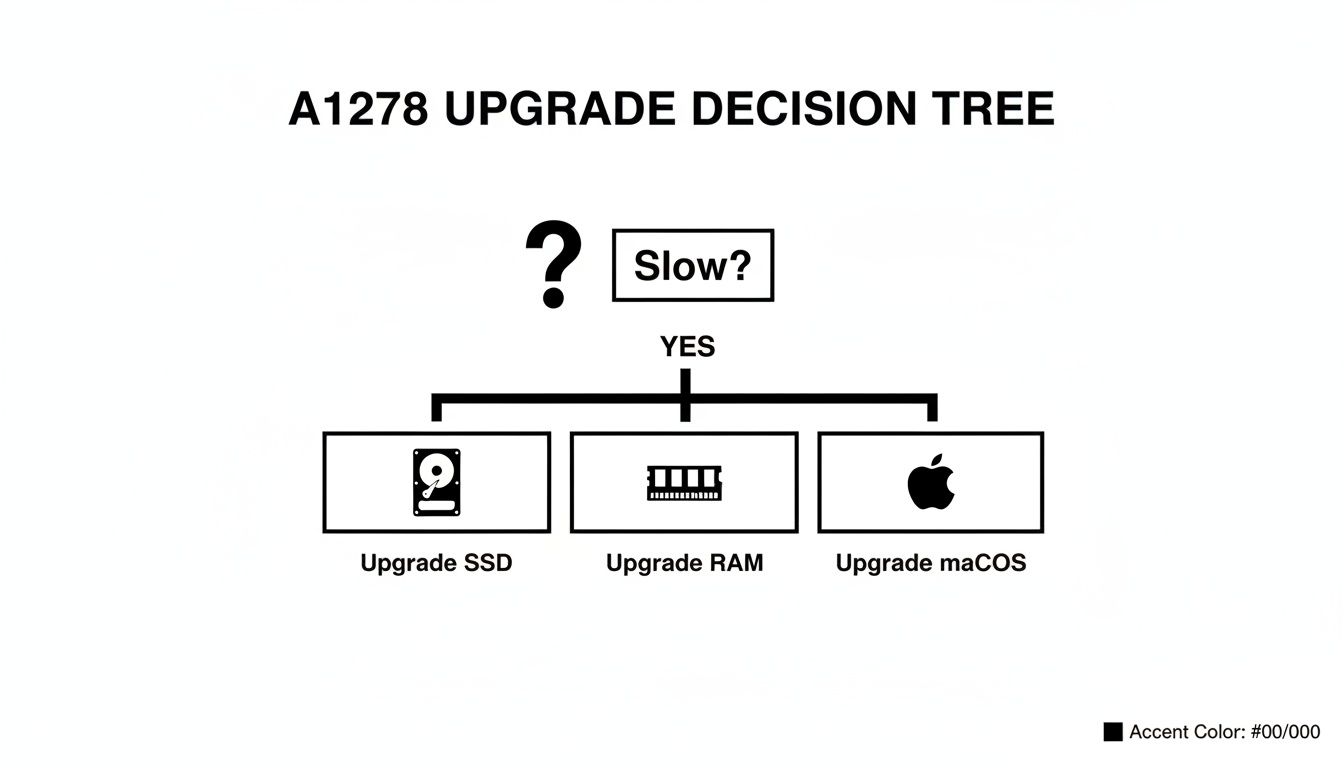
As you can see, a slow A1278 usually points to one of three things: the old hard drive, not enough RAM, or a bogged-down operating system.
The Flashing Folder with a Question Mark
One of the most unnerving things you can see on your A1278 is a grey screen with a folder icon flashing a question mark. All this means is your MacBook can’t find the operating system to start up. Think of it like a librarian who can't find the main card catalogue—they know the library is there, but they don't know where to start.
While it looks serious, the cause is usually pretty simple. The number one culprit is a failing SATA hard drive cable. This little ribbon cable is famous for wearing out over the years. Of course, it could also mean your operating system is corrupted or the hard drive itself has finally given up.
A flashing folder is your Mac’s way of saying, "I'm awake, but I can't find my instructions." More often than not, it’s a communication breakdown caused by that delicate hard drive cable rather than a total system failure.
Battery and Power Problems
Does your A1278 shut down the instant you unplug the charger? Or maybe you’ve seen the "Service Recommended" warning pop up. These are classic signs that your battery has run its course. The lithium-ion batteries in these MacBooks are good for about 1000 charge cycles, and after that, they just can't hold a charge like they used to.
But sometimes the problem is bigger. If your MacBook Pro won't turn on at all, we could be looking at a dead battery, a faulty MagSafe charging port, or a more serious logic board issue. We cover some of these possibilities in our guide on what to do when your MacBook Pro is not turning on. A spent battery is an easy swap, but a machine that’s completely dead needs a much closer look.
Unresponsive Keyboard and Trackpad
It’s incredibly frustrating when your keyboard or trackpad suddenly stops working, but believe it or not, this is another well-known A1278 quirk. The issue usually isn't the keyboard or trackpad itself, but the internal ribbon cables that connect them to the main board. They can easily get knocked loose or damaged.
There’s another culprit for trackpad failure: a bulging battery. As an old battery starts to fail, it can swell up and push against the underside of the trackpad, making it impossible to click. If your trackpad feels stiff, check for battery swelling right away—it can cause permanent damage if left alone.
Here’s a quick checklist for these issues:
- Trackpad Issues: Does it feel stiff or refuse to "click"? A swollen battery is the most likely cause.
- Keyboard Issues: If only some keys are working or the whole thing is dead, the connecting cable is probably loose or damaged.
- No Power to Peripherals: In rare cases, the logic board itself might have a fault, which would require a professional diagnosis.
Overheating and Fan Noise
If your A1278 sounds like it’s preparing for takeoff every time you open a few browser tabs, you've got an overheating problem. Over the years, dust and lint get sucked into the machine, clogging up the fan and heat sink. This blanket of grime stops the system from cooling itself properly.
At the same time, the original thermal paste that helps transfer heat from the processor to the heat sink dries out and turns to dust. This stuff is critical for keeping the brain of your Mac cool. Cleaning out the fan and reapplying fresh thermal paste is a standard maintenance job that makes a world of difference. For anyone in Dundas, Hamilton, or the surrounding area, it’s a quick and affordable service that can add years to your MacBook's life.
Your A1278 Repair Options in Hamilton
So, you've figured out what’s wrong with your MacBook Pro A1278. Now what? You're basically at a fork in the road. You can either roll up your sleeves and try to fix it yourself (DIY), or you can hand it over to a professional. Both paths have their ups and downs, and the best choice really boils down to your own technical skill, the complexity of the repair, and frankly, how much your time is worth.
Going the DIY route can be incredibly satisfying. With endless tutorials on YouTube, tackling a common job like a battery swap or a RAM upgrade can seem pretty manageable. But it's not without its risks. Even though the A1278 is far more repair-friendly than today's MacBooks, it’s still packed with tiny screws and delicate ribbon cables that are surprisingly easy to mess up if you don’t have a steady hand and the right tools.
DIY vs. Professional Service
When you decide to fix it yourself, you’re also taking on the responsibility of sourcing parts. This can be a real gamble. The internet is flooded with cheap, knock-off components that might save you a few dollars upfront but often fail within months or, in the case of batteries, can even be a safety hazard. A professional shop already has trusted suppliers for high-quality parts, so you know the job is getting done right the first time.
And then there are the tools. A simple repair might require special pentalobe and tri-wing screwdrivers, spudgers, and an anti-static mat. For anything more serious, like figuring out what’s wrong with the logic board, technicians are using multimeters and microsoldering stations—gear that’s well beyond what most people have in their garage. This is where a local expert in Hamilton can be a lifesaver, turning what could be a frustrating weekend project into a fast, guaranteed fix.
The real value in professional service isn’t just the repair itself; it’s the peace of mind. It’s knowing an expert is handling your machine, and their work is backed by a warranty that protects your investment.
Klimka Computer Solutions: Your A1278 Specialist
For anyone in Hamilton and the surrounding area, Klimka Computer Solutions is the place to go to breathe new life into your MacBook Pro A1278. We know these machines inside and out and treat them with the care they deserve. Our team is fully equipped to handle everything from simple upgrades to the most complicated logic board repairs.
We offer a full lineup of services specifically for the A1278, including:
- SSD Upgrades: The single best thing you can do to make your Mac feel brand new.
- Battery Replacements: Get your MacBook’s portability back with a fresh, high-quality battery.
- RAM Upgrades: Finally get the smooth, lag-free multitasking performance you need.
- Logic Board Diagnostics: We can solve those tricky power and performance issues that leave others stumped.
Our entire approach is built on honesty and transparency. We give you a clear diagnosis and upfront pricing so there are no surprises. To see everything we can do for your machine, you can learn more about our specialized MacBook repair services in Hamilton. We make it affordable and easy to get your A1278 running like new again.
Understanding Repair Costs
Hanging onto your A1278 is a smart move, and the cost to repair it is usually far less than buying a new laptop. A well-cared-for A1278 still holds decent value. As a reference point, trade-in sites like Gazelle reported average payouts of $320 for working models in 2024. Industry data also shows that a simple 16GB RAM upgrade can increase its resale value by as much as 35%. These numbers make it clear: this is an asset worth maintaining.
To help you get a sense of what to expect, here’s a breakdown of typical repair costs for the MacBook Pro A1278 here in Hamilton.
A1278 Repair Cost Estimates in Hamilton
This table gives you a ballpark idea of costs for the most common A1278 repairs, helping you see just how affordable it is to keep this classic Mac in top shape.
| Repair Service | Estimated Cost Range (CAD) | Typical Turnaround Time |
|---|---|---|
| SSD Upgrade (500GB) | $150 – $250 | 1-2 Business Days |
| Battery Replacement | $120 – $180 | Same Day / 1 Business Day |
| RAM Upgrade (to 8GB/16GB) | $90 – $200 | Same Day / 1 Business Day |
| Hard Drive Cable Replacement | $100 – $150 | 1-2 Business Days |
| Fan Cleaning & Thermal Paste | $80 – $120 | Same Day / 1 Business Day |
As you can see, even a major upgrade is just a fraction of the price of a new computer. By working with a trusted local Hamilton repair service, you’re not just fixing a problem—you’re extending the life of a truly reliable and beloved piece of tech.
Why Investing in Your A1278 Is a Smart Choice
Deciding to repair or upgrade your MacBook Pro A1278 isn't just about fixing a problem; it's a savvy move for your wallet and the planet. In an era where tech seems designed to be disposable, hanging onto this workhorse means you're actively cutting down on electronic waste. For a community as environmentally-minded as Hamilton, that’s a big win. Every A1278 we keep running is one less piece of hardware headed for the landfill.
It's also a no-brainer financially. Think about it: a full performance boost with a snappy new SSD, a bump up to 8GB or 16GB of RAM, and a fresh battery costs just a fraction of a new MacBook. You end up with a machine that feels zippy and modern without that eye-watering price tag, making it one of the best value-for-money options out there. If you're weighing your options, getting some tips for buying a second-hand Apple laptop can give you a better feel for the market.
Timeless Design and Unmatched Practicality
Let’s be honest, there's a reason people still love their A1278s. They come from a time when Apple built things with durability and user access in mind. That solid aluminum unibody just feels tough and dependable in a way many of today’s ultra-thin laptops don't.
And that keyboard! The comfortable key travel and satisfying click are a world away from the much-maligned butterfly keyboards that came later. For anyone in Hamilton who spends their day typing—writers, students, professionals—this keyboard alone is reason enough to keep the A1278 in service.
The MacBook Pro A1278 is a masterclass in functional design. It has the ports people actually need—USB-A, an Ethernet port, an SD card slot, and even a disc drive. These are features stripped from modern MacBooks, forcing everyone into a life of carrying around a pouch full of expensive dongles.
A Sustainable and Rewarding Investment
Putting a bit of care into your A1278 is a statement. It’s a commitment to sustainability and good old-fashioned practicality. This is a machine you can actually open up, understand, and make better. Every upgrade breathes new life into it, ensuring it remains a reliable partner for years.
- Financial Sense: A complete upgrade package can run you less than 25% of the cost of a new MacBook Pro. The return on that investment is massive.
- Environmental Impact: Repairing is one of the best ways to fight e-waste, a major concern for communities like Hamilton and Dundas.
- Practical Features: You get to hold onto the useful ports and fantastic keyboard that are now a thing of the past.
A new battery is often the first and most transformative upgrade. It brings back that grab-and-go portability, and with the right care, it will serve you well for years. We've actually put together a guide on how to extend laptop battery life with some easy-to-follow advice. At the end of the day, investing a little in your trusty Mac Pro A1278 just makes sense—it saves you money, helps the environment, and keeps a truly great piece of tech doing what it does best.
Your MacBook Pro A1278 Questions Answered
After years of getting the job done, you probably have a few questions about what the future holds for your trusty MacBook Pro A1278. The good news is this classic machine still has a ton of life left in it. We've put together answers to the most common questions we hear from A1278 owners right here in Hamilton.
Is It Still Worth Upgrading a MacBook Pro A1278?
Without a doubt, yes. For a fraction of what a new laptop costs, you can give your A1278 a massive performance boost. The single best thing you can do is swap out the old mechanical hard drive for a modern Solid State Drive (SSD). The difference is night and day—your boot times and app loading will feel incredibly snappy.
Pair that with a RAM bump to 8GB or even 16GB, and you’ll be multitasking smoothly. For day-to-day work like browsing, emails, office documents, and even some light photo editing, an upgraded mac pro a1278 offers unbeatable value. It'll easily keep up with your needs for years to come.
Upgrading an A1278 is one of the smartest tech investments you can make. The performance jump you get from an SSD and more RAM is so dramatic that it often makes the machine feel faster than many brand-new, budget-friendly laptops.
What’s the Newest macOS My A1278 Can Run?
The latest officially supported macOS really depends on which year your model is from. The mid-2012 models are the most capable, running all the way up to macOS Catalina (10.15), which is still a very functional and modern operating system.
If you have an older model from 2009-2011, you'll officially top out at macOS High Sierra (10.13) or El Capitan (10.11). While there are unofficial tools like OpenCore Legacy Patcher that can force newer versions onto these machines, they can be unstable and are really only for tech-savvy users who don't mind a bit of troubleshooting.
For the best blend of modern features and rock-solid performance, we always suggest sticking to the latest officially supported macOS for your specific Mac. A professional here in Hamilton can help you figure out the best OS to install, ensuring you get maximum stability and security without the headaches of unsupported software.
How Do I Know if My A1278 Battery Needs Replacing?
The most obvious clue is that your MacBook dies almost immediately after you unplug it, sometimes within just a few minutes. When you’ve lost that grab-and-go portability, you know the battery's health has taken a serious hit.
You can also check its status right from macOS. Here's how:
- Click the Apple menu in the top-left corner.
- Select About This Mac.
- Click on System Report.
- In the new window, find and click on the Power section in the left-hand column.
You're looking for the "Condition" status. If it reads "Service Recommended" or "Replace Now," it's time for a new one. Also, take a peek at the "Cycle Count." If it’s getting close to 1000 cycles, the battery is reaching the end of its designed lifespan. Replacing it not only restores your freedom from the power cord but also prevents a swollen battery from damaging your trackpad from underneath.
Where Can I Get My MacBook Pro A1278 Repaired in Hamilton?
For reliable, expert service on your MacBook Pro A1278 in Hamilton, Ancaster, Dundas, or the nearby areas, your best bet is a local specialist. A professional shop that truly knows these models inside and out can handle everything from quick SSD upgrades and battery swaps to more complex logic board repairs.
Using high-quality parts and drawing on years of experience is the key to a repair that lasts. A trusted local technician can give you an accurate diagnosis and a straightforward quote, taking all the guesswork out of the equation.
This ensures your classic mac pro a1278 gets the professional care it deserves, extending its life and saving you from the high cost of buying a new machine. It’s a practical and sustainable way to keep your dependable laptop in the game.
If your MacBook Pro A1278 needs a performance boost, a new battery, or a professional diagnosis, our team is here to help. At Klimka Computer Solutions, we provide fast, honest, and affordable repairs for the Hamilton community. Contact us today to see how we can bring your classic Mac back to life.
No Responses