When someone asks what the best firewall for a small business is, the answer has evolved. It’s no longer about basic filtering. Today, it’s a solution like a Unified Threat Management (UTM) or Next-Generation Firewall (NGFW) that bundles multiple security tools into one powerhouse appliance, giving you serious protection without the headache of managing a dozen different systems.
Why a Firewall Is Your Business’s First Line of Defence
Think of a firewall as the digital equivalent of locking the front door to your office. It's not just another piece of tech; it’s the essential barrier that inspects every bit of data trying to get into or out of your network. Its job is to spot and block malicious traffic before it ever gets a chance to cause damage.
Without that fundamental layer of security, your network is wide open to a relentless storm of automated attacks, hacking attempts, and other cyber threats. This protection is absolutely critical for keeping your business running and your sensitive data safe.
The Real Threats Facing Local Businesses
Cybercriminals love targeting small businesses precisely because they bet on weaker security. This puts companies all over Southern Ontario, from Hamilton to Mississauga, squarely in their crosshairs. The stakes are incredibly high, and it's about much more than just losing money.
A single security breach can trigger a cascade of disasters:
- Data Theft: Losing irreplaceable client details, financial records, and confidential business plans.
- Operational Disruption: Crippling downtime that grinds sales, production, and customer support to a halt.
- Reputational Damage: Shattering the trust you've built with your customers, which can be nearly impossible to win back.
The fallout from one successful attack can be catastrophic. If you look at the numbers, 94% of small and medium-sized businesses have been hit by at least one cyberattack, with phishing and credential theft making up around 73% of those breaches. The threat is real and constant for businesses across the Greater Toronto Area.
Comparing Risks: With vs. Without a Firewall
To really grasp its value, let’s compare a protected network to an unprotected one. It’s like the difference between a building with a security guard checking IDs at the door and one where the door is just left wide open.
| Network State | Key Risks and Vulnerabilities |
|---|---|
| Without a Firewall | Completely exposed to automated scans, direct malware injections, and brute-force access attempts from anywhere online. |
| With a Basic Firewall | Blocks obvious threats based on simple, predefined rules. This offers a foundational shield against the most common attacks. |
| With an Advanced Firewall | Actively inspects data packets for complex threats, prevents intrusions, filters out harmful web content, and stops sophisticated attacks like ransomware. |
A firewall is the non-negotiable foundation of your cybersecurity strategy. It filters the noise and outright hostility of the internet, allowing you to conduct business safely and securely.
Ultimately, investing in the right firewall is a proactive move to prevent a devastating incident. It's an indispensable tool for any business owner in Hamilton serious about protecting their assets and ensuring long-term stability. For those already facing the aftermath of a breach, professional help like our guide to ransomware cleanup in Hamilton becomes the critical next step.
Understanding Your Firewall Options
Before you can pick the right firewall, you need to know what you’re actually choosing from. The term "firewall" isn't a one-size-fits-all label; it covers a whole family of technologies, each built for a different job. Getting a handle on these categories is the first real step to making a smart decision that actually protects your business.
Your options range from a physical box humming away in your Vaughan office to a service managed entirely online. Let's break down the main types to see where your business fits in.
Hardware vs. Software Firewalls
The classic starting point is the choice between hardware and software. A hardware firewall is a physical device that you plug in between your internet source and your company network. It acts as a dedicated gatekeeper for the whole office, scrutinizing every bit of data before it ever reaches your computers or servers.
On the other hand, a software firewall is an application you install on each computer or server. It’s designed to protect that one machine, not the entire network. While it’s a critical piece of the security puzzle, it’s not a replacement for a proper network-wide defence. We dive deeper into this type of endpoint security in our guide to the best antivirus software for small businesses.
For most businesses in the Hamilton and Toronto area, a hardware firewall is non-negotiable. It creates a strong perimeter defence for every single device connected to your network, something a software-only approach simply can't do alone.
Cloud Firewalls: The Modern Approach
A cloud firewall, often called Firewall-as-a-Service (FWaaS), shifts the hardware and management out of your office and into the cloud. All your business traffic is routed through a secure provider's data centre, where it's filtered and inspected before being sent to your team.
This is a fantastic option for businesses with remote employees or multiple offices, as it ensures everyone gets the same level of protection, no matter where they are. It scales easily as you grow, is always kept up-to-date by the provider, and frees you from ever having to manage a physical box again.
UTM and NGFW: The All-in-One Powerhouses
As cyber threats got more complicated, firewalls had to get smarter. This evolution gave us powerful, multi-layered devices that are perfectly suited for small businesses that need serious security without the headache of juggling a dozen different tools.
-
Unified Threat Management (UTM): A UTM is the Swiss Army knife of security. It packs a standard firewall, antivirus scanning, web content filtering, and intrusion prevention into a single appliance. This approach simplifies everything, giving you a powerful, cost-effective security solution in one package.
-
Next-Generation Firewall (NGFW): Think of an NGFW as a UTM with a higher IQ. It does everything a UTM does but adds more advanced inspection tools, like application-level awareness and integrated threat intelligence, to spot and block sophisticated attacks that older firewalls would miss.
While exploring these options, it's worth noting there are even more specialized tools. For instance, businesses with public-facing websites or applications might look into Web Application Firewall (WAF) solutions for an added layer of targeted defence. For most small businesses, though, a UTM or NGFW hits the sweet spot, delivering comprehensive, consolidated protection.
How to Choose the Right Business Firewall
Knowing the different kinds of firewalls is a good first step, but the real work starts when you have to pick one for your own business. Choosing the right firewall isn’t about ticking boxes on a generic checklist; it’s about matching the technical specs to how your team actually works day-to-day.
Let's cut through the theory and get practical. We’ll break down the essential criteria that truly matter for a small business, whether you’re a busy accounting firm in Brampton or a growing retail shop right here in Hamilton.
Decoding Technical Specifications
When you start looking at firewall models, you’ll be buried in technical jargon. Don't get overwhelmed. For a small business, two numbers matter more than almost anything else: throughput and concurrent sessions. Get these wrong, and performance will suffer.
-
Throughput (Mbps/Gbps): Think of this as the width of the digital highway into your office. It tells you how much data the firewall can handle at once. If you pay for a 1 Gbps internet plan but your firewall maxes out at 500 Mbps, you’ve just created a permanent traffic jam. Your firewall's throughput should always match, or better yet, exceed your internet speed.
-
Concurrent Sessions: This is the number of individual connections your firewall can keep track of at the same time. Every time someone checks an email, opens a cloud document, or even just loads a webpage, a new session is created. An office with just 10 employees can easily generate thousands of these sessions. If the firewall's limit is too low, it will start dropping connections, causing everything to feel slow and unreliable.
Choosing a firewall with inadequate throughput or session capacity is like buying a sports car and then driving it exclusively in rush-hour traffic. It looks good on paper, but it will never deliver the performance you paid for.
Must-Have Features for Modern Businesses
Beyond raw speed, the best firewalls for small businesses come packed with features built for today's threats and work styles. These aren't just nice-to-haves anymore; they're essential for staying secure and productive.
A Virtual Private Network (VPN) is non-negotiable if you have staff working from home or travelling. A VPN creates a secure, encrypted tunnel from their laptop right back to your office network. This lets them access shared files and internal systems safely, protecting sensitive data from being snooped on over unsecured public Wi-Fi.
You'll also want to look for integrated security services, which usually come standard in a UTM or NGFW appliance. Key features include:
- Antivirus Gateway: This scans files and data for malware before they can land on your computers.
- Web Filtering: Lets you block access to dangerous websites and control what categories of sites your employees can visit on company time.
- Intrusion Prevention System (IPS): This is your digital security guard, actively watching network traffic for suspicious activity and shutting down potential attacks automatically.
For any small business in Southern Ontario, a strong firewall is the foundation of your defence. It's one of the most practical cybersecurity steps for small businesses you can take.
The Importance of Easy Management
A powerful firewall is completely useless if it's too complicated to configure and maintain. Most small business owners don't have an IT department on standby, so the device’s management interface needs to be clean, intuitive, and easy to understand.
This is more important than ever. Cybercriminals love targeting small businesses, with automated attacks happening roughly every 11 seconds. In fact, companies with fewer than 100 employees are 2.5 times more likely to be targeted than larger corporations, which is why a manageable and effective firewall is so critical. You can find more details on these trends and discover more insights about small business cybersecurity statistics at BroadbandSearch.net.
A system that requires constant, expert-level adjustments will quickly become more of a liability than an asset. You need a solution that simplifies your security, not one that adds another complex task to your plate. For many local businesses, the smartest move is to get expert help. Our team provides professional firewall setup for businesses in Hamilton, ensuring it’s configured perfectly from day one.
To help you sift through the options, here’s a quick checklist of what to look for when you're comparing firewalls.
Firewall Feature Checklist for Small Businesses
| Feature | Why It Matters for Your Business | Ideal Scenario |
|---|---|---|
| High Throughput | Ensures your firewall doesn't slow down your internet connection, keeping your team productive. | Throughput rating is higher than your current internet speed, with room to grow. |
| Sufficient Concurrent Sessions | Prevents connection drops and slowdowns as your team uses cloud apps, email, and websites. | The number comfortably exceeds the total sessions generated by all users and devices. |
| VPN Support | Securely connects remote and travelling employees to the office network, protecting company data. | Supports modern VPN protocols (like SSL VPN) and is easy for users to connect to. |
| UTM/NGFW Features | Provides layered security (antivirus, web filtering, IPS) in one device, simplifying protection. | The device includes a comprehensive security subscription that is regularly updated. |
| Intuitive Management | Allows you or your team to easily monitor network activity, view reports, and make basic changes. | A web-based dashboard with clear visuals and easy-to-understand alerts. |
| Scalability | The firewall can grow with your business, supporting more users and faster internet speeds in the future. | The model you choose has higher-end options in the same family for an easy upgrade path. |
This table should give you a solid framework for evaluating different models and making a choice that truly fits your business needs, not just now, but for years to come.
Comparing Firewall Solutions for Real-World Scenarios
Generic advice on picking a firewall doesn't work because no two businesses are the same. A solution that's a perfect fit for a retail shop might be totally inadequate for a professional services firm. To find the best firewall for your small business, you have to see how these technologies actually perform in situations that look a lot like your own.
Let's ditch the abstract feature lists and get into some practical, real-world examples. By walking through two very different local business scenarios, we can see how unique operational needs call for different security strategies. This should help you get a clearer picture of what your own company really requires.
This decision tree gives you a simple visual starting point to figure out which firewall features matter most for your specific business model.
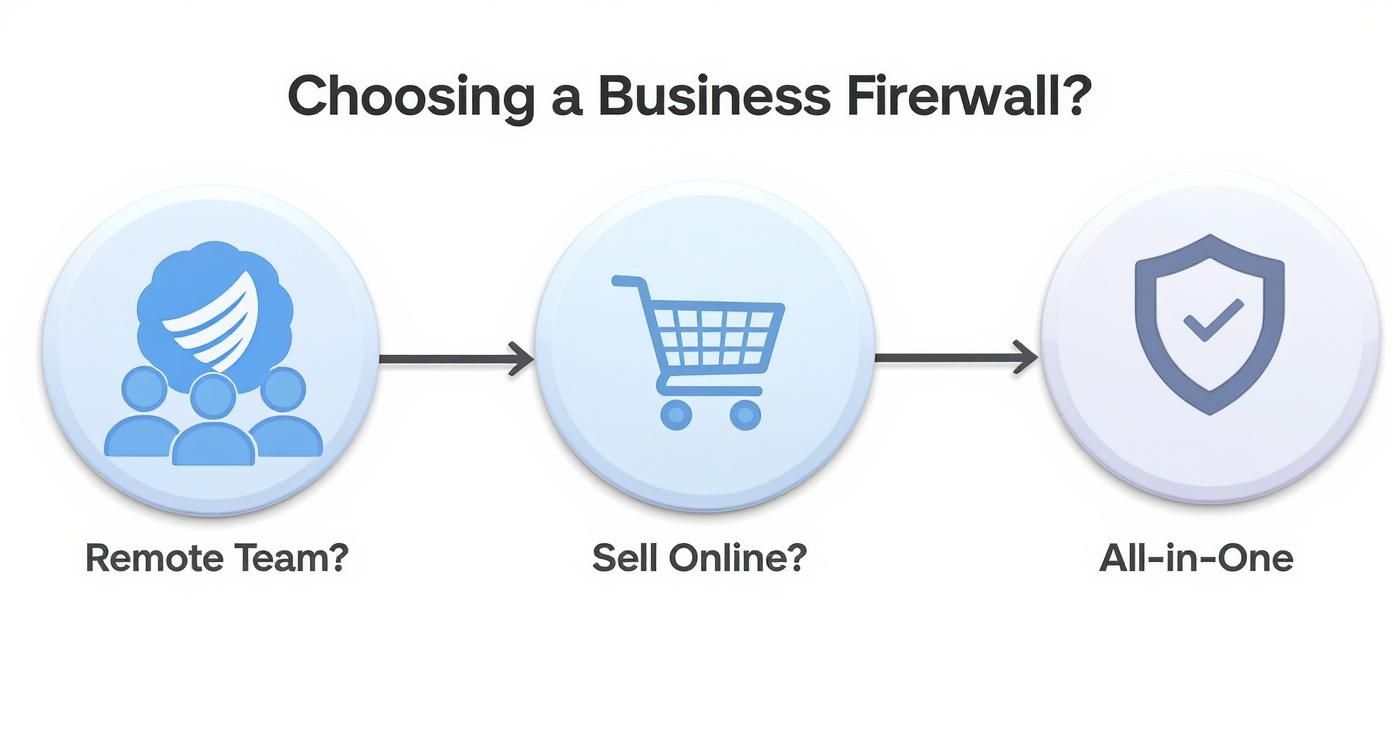
The flowchart makes it clear: factors like having a remote team, selling online, or needing an all-in-one security device directly shape what kind of firewall will serve you best.
Scenario One: The Oakville Law Firm
Picture a law firm in Oakville with 15 staff members—lawyers, paralegals, and support staff. They handle incredibly sensitive client information, from financial records to confidential case files. Protecting that data is their absolute number one priority. On top of that, several people need to securely access case files when working from home or from the courthouse.
For a business like this, security and compliance aren't just nice-to-haves; they're non-negotiable.
- Primary Needs: Airtight data security, a robust and reliable VPN for remote work, and detailed logging for compliance audits.
- Top Threats: Phishing emails trying to steal login credentials, ransomware attacks aiming to lock up client files, and unauthorized access to their network.
- Recommended Solution: A Next-Generation Firewall (NGFW) deployed right in their office (on-premise) is the clear winner here.
An NGFW has the muscle for deep packet inspection and application-level control, which is exactly what's needed to guard sensitive legal data. Its advanced Intrusion Prevention System (IPS) can actively stop sophisticated attacks in their tracks, while its high-quality VPN ensures remote connections are both stable and highly secure. The detailed logging is also critical for proving due diligence and meeting industry compliance standards.
An on-premise NGFW gives the law firm direct, physical control over their security hardware and policies—a crucial factor when you're protecting legally privileged information. While a cloud solution could work, having the actual device in their Oakville office provides an extra layer of confidence.
The total cost will include buying the hardware, paying for annual security subscriptions (like threat intelligence feeds and IPS updates), and maybe a managed service contract to keep it perfectly configured. It's a significant investment, but one that's easily justified when you consider the immense financial and reputational damage a data breach would cause.
Scenario Two: The Markham E-commerce Startup
Now, let's switch gears and think about a fast-growing e-commerce startup in Markham. They have a small core team of five, but their website processes thousands of online transactions every single day. Their entire business depends on their online presence, making website uptime, performance, and customer data security absolutely vital.
Their network needs couldn't be more different from the law firm's.
- Primary Needs: High network throughput to manage all the web traffic, solid protection for their web server, and the ability to scale security up or down quickly as the business grows.
- Top Threats: Denial-of-Service (DoS) attacks that could knock their website offline, SQL injections or cross-site scripting (XSS) aimed at stealing customer payment data, and credit card fraud.
- Recommended Solution: A cloud-based firewall paired with a Web Application Firewall (WAF) is the smarter play here.
A traditional on-premise firewall would be overwhelmed by the fluctuating web traffic and wouldn't offer the specialized protection their web application needs. A cloud firewall (FWaaS) provides virtually unlimited scalability and high throughput, making sure the website stays fast and responsive, even during a Black Friday sales rush.
Even more importantly, adding a WAF gives them a specialized shield for their e-commerce platform. It’s designed specifically to block the kinds of attacks that target websites. This layered approach protects both the company’s internal network and their customer-facing application. Proper security is a cornerstone of any successful business infrastructure, a topic we cover in more detail in our network setup and optimization guide.
Making the Right Choice for Your Business
These scenarios clearly show that there's no single "best firewall for small business." The right choice is completely dependent on your specific operations, your biggest risks, and your long-term goals.
Before making a decision, it helps to map out your own needs. The table below provides a quick reference to help you connect common business types with the firewall solutions that usually fit best.
Firewall Solution Comparison by Business Type
| Business Scenario (e.g., Retail Shop, Professional Services) | Recommended Firewall Type | Key Features Needed | Typical Budget Range |
|---|---|---|---|
| Retail Store with Guest Wi-Fi | UTM Appliance | Secure Guest Wi-Fi, Content Filtering, PCI DSS Compliance Tools | $500 – $1,500 |
| Professional Services (Law, Accounting) | NGFW (On-Premise) | Advanced Threat Protection, Secure VPN, Granular Access Control, Logging | $1,500 – $5,000+ |
| E-commerce or Online Business | Cloud Firewall (FWaaS) + WAF | High Throughput, DDoS Protection, Web Application Security | $100 – $500+/month (subscription) |
| Fully Remote Small Business | Cloud Firewall (FWaaS) or SASE | Zero Trust Network Access (ZTNA), Identity-Based Policies, Endpoint Security Integration | $50 – $200/user/month |
| Small Office with Basic Needs | Software Firewall or Basic UTM | Stateful Packet Inspection, Basic VPN, Antivirus Gateway | $300 – $1,000 |
This table is a starting point. By analyzing your own business—identifying your most valuable data, biggest risks, and daily operational needs—you can move from a generic search to a focused, confident decision. Whether you need the fortress-like security of an on-premise NGFW or the agile protection of a cloud solution, understanding your unique context is the key.
Understanding the True Cost of Firewall Ownership
The price you see on the box is just the down payment. When it comes to a business-grade firewall, the real investment becomes clear when you look at the total cost of ownership (TCO). This includes all the ongoing, and sometimes hidden, expenses that come after the initial purchase.
Getting this full financial picture is critical. If you only budget for the hardware, you'll face nasty surprises down the road, and your security could become dangerously outdated.
Beyond the Initial Purchase Price
Once you’ve bought the physical firewall, the spending has really just begun. The true power of a modern Unified Threat Management (UTM) or Next-Generation Firewall (NGFW) lies in its active security services, which are almost always sold as annual subscriptions.
Think of these subscriptions as the device's lifeblood, not optional add-ons. They provide the constant updates needed for:
- Antivirus and Malware Definitions: This keeps your firewall in the loop on all the latest threats circulating online.
- Intrusion Prevention System (IPS) Signatures: These are the updated rules that help the firewall spot and shut down new attack methods.
- Web and Content Filtering: This ensures the database of malicious websites and risky content is always up to date.
Without active subscriptions, your expensive piece of hardware quickly loses its edge and functions more like a basic router, leaving your network wide open.
"A firewall without active security subscriptions is like a security guard who has been stripped of their radio and access to security alerts. They might be present, but they are functionally blind to modern threats."
Factoring in Management and Maintenance
Then there's the human cost. Who is going to install, configure, and look after this thing? A do-it-yourself approach might seem like a money-saver at first, but the hidden costs in staff time and potential mistakes can be staggering.
Just think about the hours your team would burn researching the right settings, applying patches, and troubleshooting problems. Every minute they spend wrestling with the firewall is a minute they aren’t focused on growing your business. That lost productivity is a very real, and often substantial, expense.
Worse yet, one wrong setting can create a security hole or bring your entire network down, leading to costly downtime. The financial hit from a single day of lost business can easily dwarf the yearly cost of professional management. This is exactly where bringing in an expert makes all the sense in the world.
You can explore the benefits of managed IT services to see how a partnership provides predictable costs and far better protection. By handing this complex job over to a local provider in the Toronto area, you ensure your firewall is always optimized, updated, and actively defending your business—turning an unpredictable expense into a smart, stable investment.
Expert Firewall Management for Toronto Area Businesses
Picking the right firewall is a huge first step, but its real power comes from proper setup and consistent management. Let's be honest, even the best piece of hardware is practically useless if it's not configured correctly. A misconfigured firewall can leave you just as vulnerable as having no protection at all, which is where a professional partnership can make all the difference for businesses across the Greater Toronto Area.
Rather than sinking countless hours into deciphering complex security rules, you can lean on local experts who do this day in and day out. A managed service provider takes the weight of cybersecurity off your plate, freeing you up to focus on what you do best: running and growing your business.
Why Partner with a Local Firewall Expert?
When you work with a local team, you get security professionals who understand the specific challenges facing businesses in communities from Hamilton to Markham. It's not just about technical support; it's about having a real partner invested in keeping your company safe.
The benefits are clear right from the start:
- Expert Configuration: We'll fine-tune your firewall settings to match your company's specific operations and risks, making sure every policy is designed to stop the threats that actually target your industry.
- Proactive Monitoring: Our team keeps a close eye on your network traffic. We look for anything out of the ordinary, catching potential threats before they have a chance to do any real damage.
- Consistent Updates and Maintenance: Forget about tracking firmware updates or subscription renewals. We handle all of it, ensuring your firewall is always armed against the very latest malware and attack techniques.
- Dedicated Local Support: Got a question or an urgent issue? You won’t be dialling a random call centre on the other side of the world. You’ll be talking to a local expert who already knows your setup inside and out.
Partnering with a managed security provider gives your small business access to enterprise-grade security talent and technology at a fraction of the cost of hiring an in-house IT team.
This approach flips the script on your security. Instead of a constant headache, it becomes a reliable, managed part of your operations. For businesses in Toronto and the surrounding areas, this means you can work with confidence, knowing your first line of defence is solid, actively managed, and always ready to protect what you’ve built.
Your Top Firewall Questions, Answered
Making the final call on a firewall can feel daunting. It's a critical piece of your business's defence, so it's natural to have some lingering questions. We get it. To help you feel confident in your decision, we've pulled together the most common questions we hear from business owners right here in Southern Ontario.
Think of this as a quick, no-nonsense Q&A to clear up any final uncertainties.
Is the Firewall on My Internet Router Enough?
This is the question we hear most often, and the answer is a hard no. The firewall built into the router your internet provider gave you is meant for basic home use, not the demands of a business. It offers only the bare minimum of protection, like blocking some unsolicited connections, but it has zero intelligence for spotting modern, sophisticated threats.
A proper business firewall, particularly a UTM or NGFW, brings layers of security that your router can't even dream of:
- Advanced scanning for malware and ransomware.
- Intrusion prevention systems that actively block attacks.
- Web content filtering to keep employees off malicious sites.
- Secure VPN access for your remote team.
Relying on your router's firewall is like using a screen door to guard a bank vault. It'll keep the flies out, but it won't stop a real threat.
How Often Do Business Firewalls Need Updates?
A professional firewall is never a "set it and forget it" device. For it to actually protect you, it needs constant attention. The device's core software, its firmware, needs to be updated as soon as the manufacturer releases a patch for a security hole. Even more critical are the security subscriptions for things like antivirus, IPS, and web filtering—these get updated automatically, sometimes several times a day, to keep up with new threats.
An outdated firewall is a vulnerable firewall. Timely, consistent updates are the only thing that keeps your security effective against what cybercriminals are trying today.
This is exactly why so many businesses in places like Hamilton and the GTA opt for a managed firewall service. Having a professional partner ensures every update is applied correctly and on time, so you’re never left exposed.
What’s the First Step for Professional Installation?
The best way to start is by booking a consultation with a local IT security expert. In that first meeting, a professional will get to know your specific business—your office setup in Burlington or Oakville, how many people are on your team, the kind of data you handle, and your remote work policies.
Based on that conversation, they can recommend the right firewall model and map out a clear plan for installation and configuration. This approach makes sure the firewall is perfectly tuned to your business from the get-go, giving you powerful protection without any of the guesswork.
Ready to secure your business with a professionally managed firewall? Klimka Computer Solutions provides expert firewall setup and managed IT services for small businesses across Hamilton and the surrounding areas. Contact us today to get started.
2 Responses
[…] your security strategy. To dig deeper and make sure you're on the right track, check out this a practical guide to choosing the best firewall for small business. It offers a great breakdown to help you compare your […]
[…] more practical advice, our guide on choosing the best firewall for your small business is a great […]