
When your MacBook screen cracks, the first question is always the same: how much is this going to set me back? In Canada, the cost to replace a MacBook screen typically falls somewhere between $150 and over $750.
That’s a pretty wide range, and the final price tag really boils down to your specific MacBook model and the kind of screen it has. Let's break down what actually goes into that cost for repairs in cities like Toronto, Vancouver, and beyond.
Your Quick Guide to MacBook Screen Replacement Costs
There’s nothing quite like that sinking feeling when you see a spiderweb of cracks across that gorgeous Retina display. Understanding the potential repair bill is the first step to getting your Mac back up and running. The cost isn't one-size-fits-all; it's a spectrum influenced by your MacBook's age, model, and the tech packed into its display.
Think of it like fixing a car's windshield. A basic screen for an older, standard model is a relatively straightforward and affordable job. But a high-end vehicle with advanced sensors and special glass? That’s going to be a more complex and expensive repair. It's the exact same principle with MacBooks. An older MacBook Air screen is on the lower end of the scale, while a modern, high-resolution Retina display from a newer MacBook Pro will naturally cost more.
Understanding the Price Tiers
The most significant factors driving the price are your MacBook's model and its screen technology. For a quick overview, we've put together a table with some typical cost ranges you can expect to see in Canada, from Halifax to Victoria.
Estimated MacBook Screen Replacement Costs in Canada by Model
| MacBook Model | Screen Type | Estimated Cost Range (CAD) |
|---|---|---|
| MacBook Air (Older) | Non-Retina | $150 – $400 |
| MacBook Pro (2012-2015) | Retina | $500 – $650 |
| MacBook Pro (2016+) | Retina (with Touch Bar) | $550 – $750 |
| MacBook Air (Retina) | Retina | $450 – $650 |
These numbers give you a solid starting point. As you can see, the older non-Retina models are the most budget-friendly to fix, while the price climbs steeply for the more advanced Retina displays, especially on newer machines.
Here’s a visual breakdown of how those costs stack up. It really highlights the jump in price that came with Retina display technology.
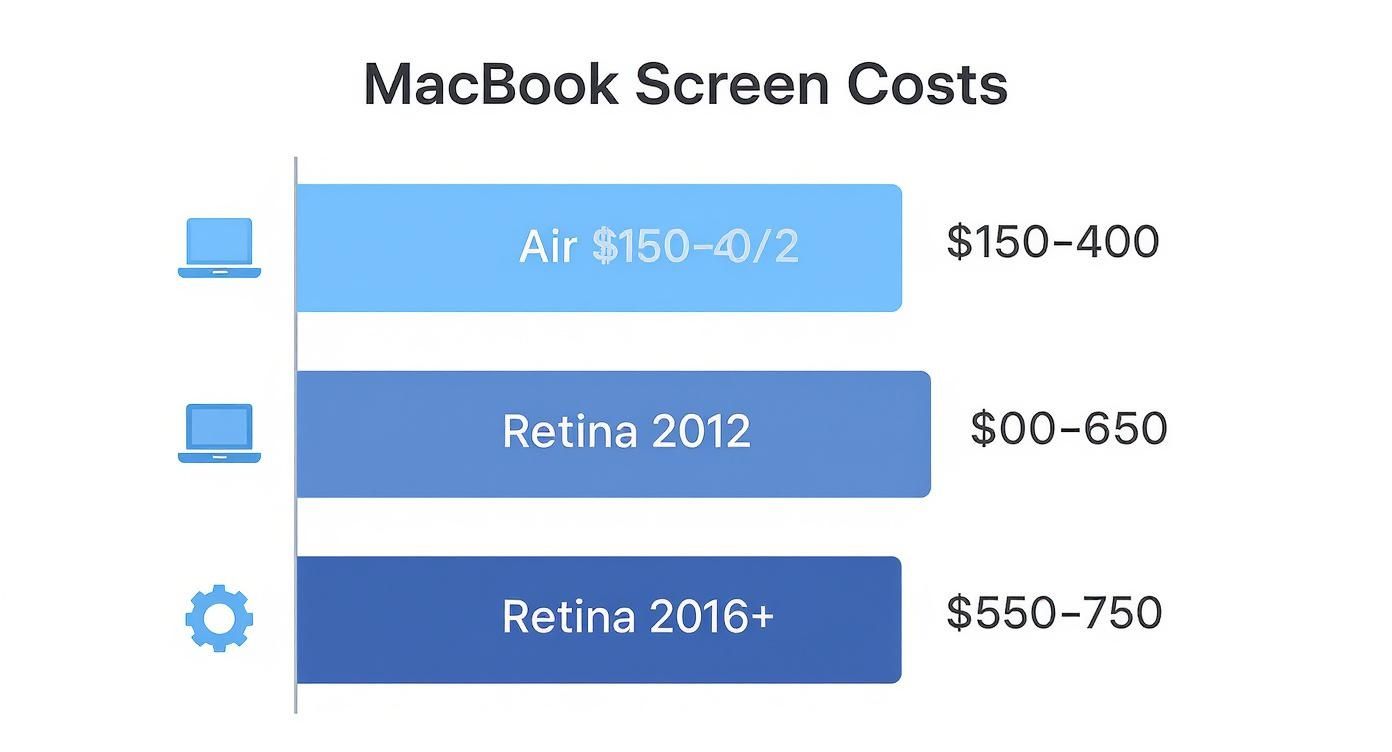
As the chart shows, the more sophisticated the screen, the higher the replacement cost.
Key Variables Influencing Your Quote
Beyond the model, a few other crucial factors will influence your final quote. The repair path you choose makes a huge difference, whether you're in Ottawa or Edmonton.
Here’s what will shape the final bill:
- Official Apple Service vs. Local Repair Shop: Going directly to Apple versus a trusted independent shop will significantly impact the cost and how quickly you get your device back.
- Part Quality: You'll have a choice between a genuine Apple (OEM) part or a high-quality third-party screen. This decision affects both the price and, potentially, the display's performance down the line.
- Labour and Diagnostic Fees: These service charges can vary from one shop to another, so they’re an important part of the total cost.
Making the right choice here is key to getting a repair that fits your budget and timeline. For a closer look at your options, our guide to the top laptop screen services can help you weigh the pros and cons.
What Actually Determines Your Repair Bill

Ever get two wildly different quotes for the same repair and scratch your head wondering why? The final price for a MacBook screen replacement isn’t just some number pulled out of thin air. It’s a careful calculation based on a few key factors, and understanding them helps you know exactly where your money is going.
Think of it like getting a bill from your mechanic. It’s never just a single line item that says "car fixed." It’s broken down into the cost of the new parts, the hourly rate for their time, and maybe even a fee for figuring out what was wrong in the first place. A MacBook screen repair works the exact same way.
The three core pieces that make up your total repair bill are:
- The Screen Assembly: This is the physical part, and it’s almost always the most expensive piece of the puzzle.
- Labour Charges: This covers the technician’s time, skill, and expertise to perform the delicate surgery on your device.
- Diagnostic Fees: Some shops charge an upfront fee just to assess the damage and provide an accurate quote.
Each of these can vary quite a bit from shop to shop, which explains why you might see such a wide range of prices.
The Biggest Factor: The Screen Itself
The single biggest item driving your bill will be the replacement screen assembly. Not all screens are made equal, and your choice here makes the biggest difference in both cost and quality. You’ve generally got two main options.
First up are Original Equipment Manufacturer (OEM) parts. These are the genuine screens, made by or for Apple. They guarantee perfect compatibility, colour accuracy, and the same performance you had out of the box. That quality comes at a premium, though, as Apple keeps a tight grip on its supply chain.
Your second option is an aftermarket or third-party screen. These are made by other companies to fit your specific MacBook. A high-quality aftermarket screen can be a fantastic, wallet-friendly alternative, often performing almost identically to the original. The key phrase there is "high-quality"—cheaper versions can suffer from poor brightness, off-kilter colours, or a shorter lifespan. A trustworthy local shop in your area, whether it's Winnipeg or Quebec City, will know how to source reliable aftermarket parts that balance cost and performance.
Labour Rates And Location
The second major part of the cost is labour. This is what you’re paying for the technician’s skilled hands and valuable time. Labour rates can shift based on a few things, mainly the shop's location and how complex the repair is.
For instance, a repair shop in downtown Toronto with high rent and overhead will likely charge a higher hourly rate than a family-run business in a smaller community like Kelowna. It’s just a reflection of the local cost of doing business. Data from major Canadian cities suggests labour rates can average around $60 to $90 CAD per hour, depending on where the shop is and its reputation.
A MacBook screen replacement is delicate work. Modern screens are fused to the top lid and tangled with fragile cables for the display, camera, and ambient light sensors. It takes a skilled technician time to carefully take everything apart, transfer components, and put it all back together without causing more problems.
Understanding Diagnostic Fees
Finally, some repair shops might charge a diagnostic fee. This is an upfront cost to have a technician properly inspect your MacBook, confirm the screen is the only problem, and give you a precise quote for the full repair.
Many reputable shops will actually waive this fee if you decide to go ahead with the repair they’ve quoted. It's their way of investing a bit of time to earn your business. It's always a good idea to ask about diagnostic fees upfront so there are no surprises on the final bill. These principles aren't just for MacBooks; you can get a broader overview in our guide to general laptop screen replacement costs.
Choosing Between Apple Service and Local Canadian Repair Shops
When your MacBook screen goes dark, you’re suddenly at a crossroads. It’s a decision that hits both your wallet and your schedule. You’ve got two main routes you can take here in Canada: head to an official Apple Store or find a trusted, local repair shop. Each path has its own set of pros and cons, and the best choice really boils down to what matters most to you.
Think of it like getting your car fixed. You could go to the official dealership, where they use branded parts and follow the manufacturer’s exact playbook. It gives you a certain peace of mind, but you’ll almost certainly pay top dollar for it. The alternative is your trusted neighbourhood mechanic—someone with years of hands-on experience, more flexible pricing, and who can probably get you back on the road a lot quicker.
The same logic applies to your MacBook. An official Apple repair is the premium, straight-from-the-source option. A local independent shop, on the other hand, offers a different mix of speed, savings, and personal service.
The Official Apple Store Experience
Going directly to Apple is the most predictable route. When you book a Genius Bar appointment in a city like Toronto or Vancouver, you’re guaranteed a repair using genuine Apple (OEM) parts. That means the replacement screen will have the exact same compatibility, colour profile, and performance as the one your MacBook came with.
On top of that, Apple backs its repairs with a solid warranty—usually 90 days or whatever is left on your original warranty or AppleCare+ plan, whichever is longer. It’s a nice safety net to have in case the new screen has any issues.
Of course, this premium service comes with a premium price tag. In Canada, Apple's official screen replacement costs are often a fair bit higher. For an out-of-warranty 16-inch MacBook Pro, you could be looking at a bill between $657 and $770 CAD. An older 13-inch MacBook Air might run you $399 to $467 CAD. Turnaround times can also be a bit of a drag, as your laptop might have to be shipped off to a central repair facility.
The Local Independent Repair Shop Advantage
For many Canadians, a local repair shop is just the more practical and budget-friendly choice. Independent shops from Calgary to Mississauga have built their reputations on offering competitive prices and much faster service. Because they aren’t tied to Apple’s pricing structure and can source excellent aftermarket parts, their quotes for a screen replacement are often significantly lower.
Speed is one of the biggest wins here. A good local technician can often get a screen replaced in a day or two—sometimes even in just a few hours. That's a huge deal when you depend on your MacBook for work or school and can't afford to be without it.
You also get a more personal experience. You can actually talk to the person who will be working on your machine, ask specific questions, and get straightforward advice. Most reputable local shops stand by their work, offering their own warranties on both the parts and the labour.
Choosing a local repair expert often means supporting a small business in your community while getting a repair that is both quicker and more affordable. It's a balance of trust, value, and convenience.
Apple Store vs. Local Repair Shop: A Comparison for Canadians
To really see the difference, let’s put the two options side-by-side. This head-to-head comparison should make your decision a little easier.
| Factor | Official Apple Store | Local Independent Repair Shop (e.g., in Toronto) |
|---|---|---|
| Parts Used | Always genuine Apple OEM parts | High-quality OEM or aftermarket parts |
| Cost | Typically higher, premium pricing | More competitive and budget-friendly |
| Turnaround Time | Can take several days or longer | Often same-day or next-day service |
| Warranty | Apple's official repair warranty | Varies by shop, but often provided |
| Convenience | Requires an appointment, may have limited locations | More locations, often accepts walk-ins |
So, what's the verdict? If your MacBook is still covered by its original warranty or an AppleCare+ plan, going through Apple is a no-brainer to keep that coverage intact. But for everyone with an older, out-of-warranty device, a reputable local shop like Klimka Computer Solutions presents a very strong, sensible alternative.
For more information, check out our detailed guide on Apple computer repair services to see how we can help.
Is a DIY Screen Replacement Worth the Risk?

For anyone with a bit of a tinkerer's spirit, the thought of a Do-It-Yourself (DIY) screen repair can be pretty appealing. The main driver is obvious and powerful: saving a good chunk of change on your MacBook screen replacement cost. After all, if you only have to pay for the part, you sidestep the labour fees entirely, potentially slashing the total bill by hundreds of dollars.
The idea is simple enough. You find a kit online, queue up a few video tutorials, and dedicate an afternoon to bringing your MacBook back from the brink. The problem is, what looks like a straightforward fix on a sped-up YouTube video is often a minefield of potential disasters for anyone who hasn't done it before.
The Reality of Modern MacBook Repairs
Let's be clear: replacing a screen on a newer MacBook isn't like changing a tire or popping more RAM into an old desktop computer. It's much closer to performing microsurgery. Apple designs its laptops with incredibly tight tolerances, using proprietary screws, powerful adhesives, and a complex web of delicate, paper-thin ribbon cables.
These parts are fragile and completely unforgiving. One misplaced pry tool, one slip of the hand, or a moment of impatience can lead to some truly catastrophic—and expensive—consequences.
These aren't just hypotheticals. They are very real risks that can quickly turn a money-saving project into a financial nightmare. A simple mistake can cause:
- Torn Ribbon Cables: Those tiny, flat cables connecting the display, camera, and sensors to the main board can rip if you so much as look at them wrong. Suddenly, you have more broken parts than you started with.
- Cracked Bezels or Casing: It takes a specific amount of force to separate the screen assembly. Too much, and you'll hear the heartbreaking crack of the surrounding plastic or aluminum.
- A Fried Logic Board: An unseen static discharge or accidentally shorting a component can destroy the single most expensive part of your MacBook. At that point, you've got a very sleek paperweight.
A DIY repair attempt gone wrong can easily escalate a $500 screen problem into a $1,500+ logic board replacement. You have to weigh the potential savings against the very real risk of multiplying the initial repair cost.
An Honest Look at Your Skills and Tools
Before you even add a DIY kit to your online cart, you need to have a serious, honest chat with yourself. Do you really have the right tools—and more importantly, the right temperament—for this kind of precision work?
You're going to need a lot more than the screwdriver that came with your last piece of flat-pack furniture. A proper repair requires a specific toolkit:
- Pentalobe and Torx screwdrivers
- Plastic spudgers and opening picks (metal is a no-go)
- Suction cups
- A heat gun or iOpener to soften the industrial-strength adhesive
- Patience. And then more patience.
This is not a job you can rush through. It demands a steady hand, meticulous organization for dozens of tiny screws, and the ability to stay cool when a part just doesn't want to cooperate. If you get frustrated easily, this probably isn't the project for you.
While some electronic repairs are quite manageable, a MacBook display assembly is one of the most complex. If you're curious about the general challenges, our overview of computer monitor repair offers more context on the intricacies involved.
For most people, the stakes are just too high, making a DIY MacBook screen replacement a gamble that isn't worth taking. Unless you’re a seasoned electronics hobbyist with a track record of successful, delicate repairs, leaving the job to a professional technician is the safest and, quite often, the most cost-effective choice you can make.
A Few Ways to Keep Your MacBook Repair Bill in Check
Seeing a steep repair quote is never fun, but you’ve got more power over that final number than you might think. A few smart moves can make a real dent in your MacBook screen replacement cost. Before you give the go-ahead on any repair, it's always a good idea to hit pause and look at all your options.
Think of it like buying a used car—you wouldn't just take the first one you see without shopping around or checking its history. Applying that same mindset here can save you a fair bit of cash and a lot of headaches.
Your Pre-Repair Checklist
Before you hand over your MacBook, run through this quick checklist. It’ll help you get a handle on your situation and might even uncover savings you didn't know you had.
-
Check Your Warranty Status: Is your MacBook still inside its one-year warranty? Or do you have an active AppleCare+ plan? If the answer is yes, your first stop should be Apple. The repair could be significantly cheaper or even free.
-
Review Your Home or Renter's Insurance: This is the one most people forget. Some insurance policies actually cover accidental damage to your electronics. It’s definitely worth a quick call to your provider to see if you can file a claim.
-
Confirm the Extent of the Damage: Is it only the screen, or is there more going on? Be upfront with the technician about what happened. Knowing the full story helps them spot any hidden problems that could cause trouble down the road.
Shop Around for Local Quotes
One of the best things you can do to control costs is to get a few different quotes. Don't feel pressured to accept the first price you hear. Instead, reach out to a couple of trusted, local repair shops in your area.
Whether you're Googling "MacBook repair Mississauga" or looking up "screen replacement Hamilton," getting two or three estimates will give you a solid idea of the current market rate. This simple step ensures you're not overpaying for the job.
When you call, have a few key questions ready:
- Does this quote include everything—parts, labour, and taxes?
- What kind of warranty do you offer on the new screen and the repair itself?
- How long will the repair take?
Getting straight answers to these questions lets you compare your options properly and helps you avoid any nasty surprises on the final bill. Any good shop will be upfront about their pricing.
Remember, the cheapest quote isn't always the best value. A slightly higher price from a shop that uses better parts or offers a longer warranty can give you more peace of mind and save you money in the long run.
Consider Cost-Effective Alternatives
Beyond just getting quotes, there are other ways to save. You don’t always need a brand-new, straight-from-the-factory part to get your MacBook looking and working like new again.
Ask your technician about using high-quality refurbished screens. These are usually genuine Apple screens that have been professionally restored to perfect working order. Going this route can give you the same sharp, vibrant display you’re used to while trimming the total cost.
Invest in Future Prevention
At the end of the day, the best way to save money on screen repairs is to stop them from happening again. Once your MacBook is fixed and back home, a small investment in some protective gear can prevent you from going through this whole expensive process a second time.
A durable hardshell case is your first line of defence against drops and bumps. When you pair that with a high-quality screen protector, you’ve got a solid shield against the common accidents that lead to cracked screens. Think of it as the cheapest insurance policy you can buy for your MacBook's display.
How to Get an Accurate Repair Quote in Your City
Walking into a repair shop without knowing your MacBook’s details is like telling a mechanic "my car is making a funny noise." You'll get a shrug, a vague guess, and maybe a surprise bill later. To get a real, accurate quote for a screen replacement in any Canadian city, you need to come prepared.
Doing a little homework first lets you compare quotes from different shops properly and spot a trustworthy technician. You're essentially handing them the exact blueprint for the job, which removes all the guesswork from their pricing.
Arm Yourself with the Right Information
Before you even start Googling "MacBook repair," you need to know two things about your laptop: its model and year. There's a world of difference between a 2015 MacBook Air and a 2022 M2 MacBook Pro, and the parts and repair complexity are miles apart. A shop in Montreal or Calgary can't give you a real price without this.
It's easy to find. Just click the Apple logo in the top-left corner of your screen and choose "About This Mac." If the screen is completely dead, just flip your MacBook over. You'll see a model number (like A2338) in tiny print on the bottom case. This is the golden ticket to an accurate quote.
Your Script for Getting a Clear Quote
Once you have your model number handy, you can call or email local shops with confidence. To avoid any nasty surprises, you need to ask a few key questions that pin down the total cost and what you’re actually getting for your money.
Here’s a simple script to follow:
- Is this quote all-inclusive? Ask them straight up: "Does that price include the screen part, the labour, and taxes?" This simple question prevents extra fees from mysteriously appearing on your final invoice.
- What is the warranty on the repair? A good shop will always back up their work. Find out how long the warranty lasts on both the new screen and the installation itself.
- What kind of screen will be used? Ask if they're using a genuine OEM Apple part or a high-quality aftermarket screen. This is a major factor in the final price and is crucial for comparing quotes fairly.
- How long will the repair take? Knowing the turnaround time helps you plan your life, especially if your MacBook is essential for work or school.
Getting a good quote is all about clear communication. When you provide the right details and ask smart questions, you turn a potentially confusing ordeal into a simple, straightforward transaction.
As you do your research, it can be helpful to look at a provider's service pricing details to get a general idea of what repair bills look like across the industry.
It also helps to understand what happens after you drop off your device. For a complete walkthrough of what to expect, from the initial diagnostic to getting your repaired MacBook back, have a look at our step-by-step guide to the MacBook repair process. Knowing the whole journey makes you a more confident customer.
Your Top Questions About MacBook Screen Costs, Answered
It's natural to have a few more questions rattling around before you commit to a repair. Let's tackle some of the most common ones we hear from our clients, so you can feel completely confident about your next steps.
Is It Really Worth Replacing the Screen on an Older MacBook?
This is the big one, and it boils down to a simple cost-benefit analysis. A good rule of thumb we use here in Canada is this: if the repair cost is more than 50% of the price of what a similar used MacBook sells for, it might be time to think about an upgrade.
That said, if your older MacBook still runs like a champ and handles everything you throw at it, a reasonably priced screen replacement can be a fantastic investment. For instance, spending under $400 on a new screen for an older MacBook Air is a smart, budget-friendly move that can easily give it a few more years of solid use.
Will a Third-Party Screen Replacement Void My Apple Warranty?
In a word, yes. Any repair performed by a service provider not explicitly authorized by Apple will void whatever is left of your manufacturer’s warranty or AppleCare+ plan. If your MacBook is still under that protective umbrella, your safest (and often only) option is to go directly through Apple.
However, once your device is out of warranty, the game changes completely. This is where local Canadian repair shops become an excellent, often more affordable, alternative.
For an out-of-warranty MacBook, your focus shouldn't be on Apple's expired coverage. Instead, it's about finding a trusted local technician in a place like Hamilton who stands behind their own work with a solid warranty on both parts and labour.
How Can I Find My MacBook Model for an Accurate Quote?
Getting a precise quote is impossible without knowing your MacBook's specific model and year. The quickest way, if your screen is still working, is to click the Apple logo in the top-left corner and choose 'About This Mac'.
If the screen is completely dead, don't worry. Just flip your MacBook over. You'll see a model number etched in tiny print on the bottom case—it will start with an 'A' followed by four numbers (like A2338). Give that number to a repair shop, and they’ll be able to give you an exact price without any guesswork.
Ready to get a clear, honest quote for your MacBook screen repair? The team at Klimka Computer Solutions offers fast, reliable service for all MacBook models right here in Hamilton. Contact us today for a straightforward assessment and expert repair.
No Responses