
That sickening crunch of a cracked laptop screen is a feeling most of us know all too well. Your heart sinks, and the first thought that pops into your head is always: "How much is this going to cost me?"
In Canada, you can generally expect a professional laptop screen replacement to set you back somewhere between $150 and $400 CAD. That price usually covers both the new screen and the labour to install it. But—and it's a big but—that's just a ballpark. The final bill can swing pretty wildly depending on your laptop's specific make and model, its screen size, and the tech behind the display.
What Really Goes Into the Cost of a New Screen?
When your screen flickers, goes black, or looks like a spider's masterpiece, it can feel like a disaster. Knowing what factors drive the repair cost helps take the sting out of the situation. The price isn't just an arbitrary number; it's a direct reflection of the screen's technology, its physical size, and any special features it might have, like touch functionality.
For those of us in Hamilton or anywhere else in Canada, getting a solid quote from a local repair shop is your first move.
It All Comes Down to Screen Technology
Let's be clear: not all screens are built the same. The technology powering your display is easily the biggest variable when it comes to replacement cost. Your standard, everyday LCD panels are the most common and the kindest to your wallet.
On the other hand, if your laptop boasts a high-end OLED or a pin-sharp 4K screen, you're looking at a higher price. These premium displays are more complex and expensive to manufacture, and that's reflected in the repair cost.
Across Canada, the cost for a laptop screen replacement has become fairly consistent among reputable repair shops. Most professional jobs land in the $150-$400 CAD range, with the exact price hinging on the model and screen type. For a closer look at how different technologies stack up, you can check out this breakdown of Canadian repair prices.
Let’s take a look at the most common types of screens and what they mean for your wallet.
- LCD (Liquid Crystal Display): This is the bread and butter of the laptop world, found in most budget and mid-range machines.
- LED (Light Emitting Diode): A step up from standard LCDs, these offer brighter, more energy-efficient displays.
- IPS (In-Plane Switching): Praised for their fantastic colour accuracy and wide viewing angles, you'll often find these in laptops built for creative professionals.
- OLED (Organic Light Emitting Diode): The top of the line. OLEDs deliver stunning contrast and true blacks, typically reserved for premium gaming and media laptops.
Now, let's put some numbers to these screen types. The table below gives you a clearer idea of what you can expect to pay for a professional replacement here in the Hamilton area.
Estimated Laptop Screen Replacement Costs in Canada by Screen Type
| Screen Type | Average Part Cost (CAD) | Estimated Total Cost with Labour (CAD) |
|---|---|---|
| Standard LCD/LED (Non-Touch) | $80 – $150 | $150 – $250 |
| IPS Panel (Non-Touch) | $120 – $200 | $220 – $320 |
| Touchscreen (LCD/LED) | $150 – $300 | $250 – $400+ |
| OLED/4K High-Resolution | $300 – $600+ | $450 – $750+ |
As you can see, the jump from a standard screen to something more specialized is significant. The complexity of replacing a delicate OLED or a bonded touchscreen panel also adds to the labour cost.
Of course, the price of the part is only half the equation. Finding a reliable service to do the work is just as important. If you want to explore your options, our guide on the top laptop screen services available is a great place to start.
Decoding Your Laptop Repair Bill
Getting a quote for a laptop screen replacement can leave you scratching your head. That final number isn't pulled out of thin air; it's a mix of two key things: the cost of the new screen and the technician's labour charge. Let's break down what you're actually paying for.
The replacement screen is usually the biggest wildcard in the final price. It's a lot like buying tires for your car. A standard set for a daily driver is one price, but a set of high-performance, run-flat tires for a sports car is in a completely different league. Laptop screens work the same way.
What Determines the Part's Price
You'll quickly find there's no "standard" price for a laptop screen. A few technical specs can really drive up the cost, and it's good to know what they are.
- Screen Size and Resolution: This one's pretty straightforward. Bigger screens use more materials, so they cost more. Likewise, a high-resolution 4K screen packs in way more pixels than a standard HD one, making it more complex and expensive to manufacture.
- Touchscreen Functionality: A touchscreen is more than just a display. It has an extra layer of technology—the digitizer—that lets it respond to your touch. That added complexity means touchscreen panels are always more expensive than their non-touch cousins.
- Display Technology: As we've touched on, the tech lighting up your display is a major cost factor. A basic LCD, a brighter LED, or a high-end OLED panel will have a huge impact on the final laptop screen replacement cost.
The infographic below really puts the price difference between screen types into perspective.
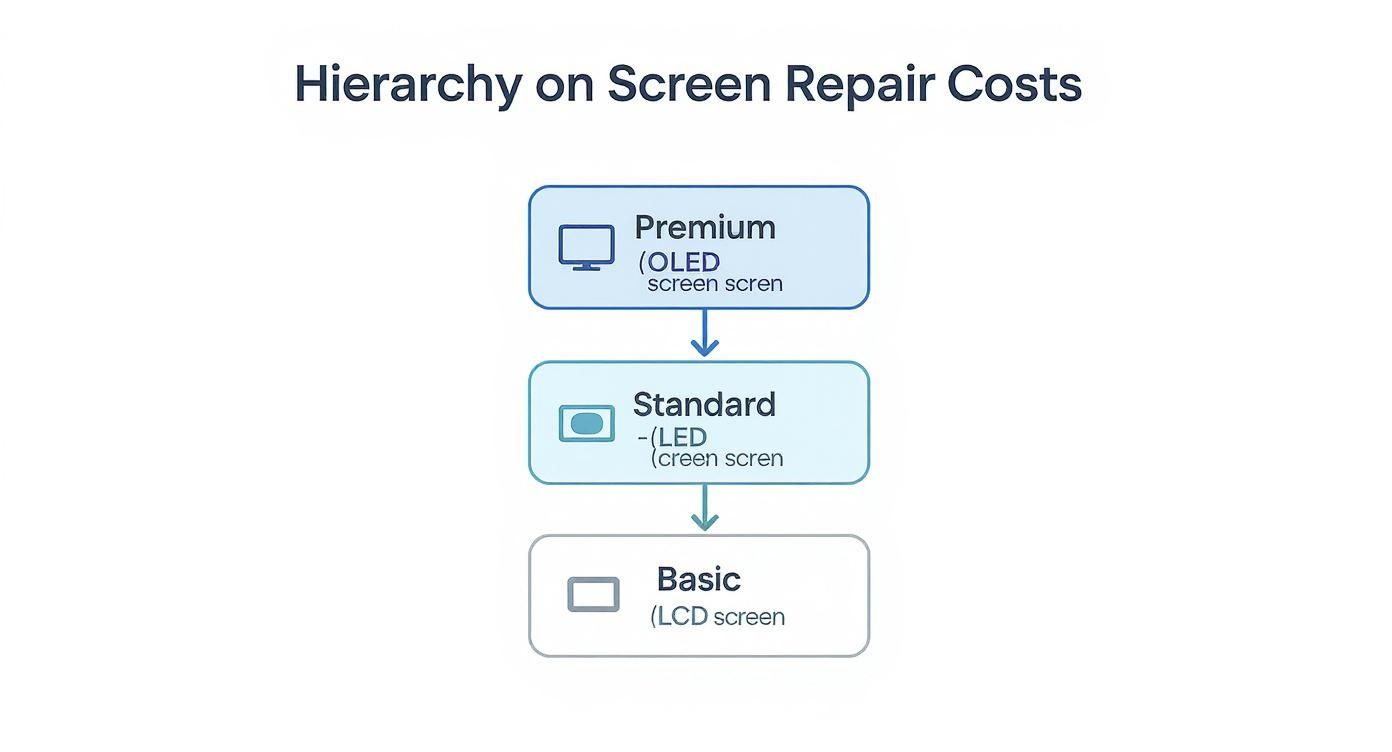
As you can see, jumping from a basic screen to a premium one isn't a small step. The advanced components and manufacturing quality come with a much higher price tag.
Understanding Labour Charges in Hamilton
The second piece of the puzzle is the labour cost. This is what you pay for the technician's time and expertise to carefully open your laptop, handle all the fragile internal connectors, install the new screen perfectly, and put it all back together without a screw out of place.
Labour fees can differ quite a bit between a local independent shop here in Hamilton and a big, authorized service centre. Your neighbourhood tech shop will often have more competitive pricing, whereas a manufacturer-certified centre might charge more for using brand-specific tools and procedures.
We see a clear trend across Canada: the bigger the screen, the higher the repair cost. For smaller laptops with 10.1 to 11.6-inch screens, Canadian technicians typically charge around $125 for a standard replacement. But for the big 17.3-inch models, that price jumps to between $175-$195. You can dig deeper into these trends in this research on home office expenses.
How Your Laptop Brand Impacts Repair Costs
When you’re staring at a cracked laptop screen, the brand name on the lid is one of the biggest factors in what the final repair bill will look like. It’s a lot like fixing a car—servicing a luxury import will almost always set you back more than working on a common domestic model, even for the same type of repair. The same logic holds true for laptops from Apple, Dell, HP, and Lenovo.
The cost differences boil down to two main things: how the laptop was designed and how easy it is to get replacement parts. Some manufacturers build their machines with repair in mind, using standard parts that are widely available. Others go for highly integrated, custom designs where one broken component means replacing an entire, expensive assembly.
The Apple Premium and Integrated Designs
Apple’s MacBooks are legendary for their sleek, beautiful designs, but that elegance comes with a hefty repair price tag. In most modern MacBook Pro models, for instance, the screen is actually fused into the entire top aluminum half of the laptop. It's a single, sealed unit. So, a "simple" screen replacement isn't simple at all—it's a full top-assembly swap.
This all-in-one approach makes the repair far more complicated and the part itself incredibly expensive. Apple also maintains tight control over their parts, meaning there are few, if any, third-party options to bring the cost down. If you find yourself in this boat, getting familiar with the specifics of MacBook computer repairs can help you figure out the best path forward.
Mainstream Brands and Part Accessibility
Things are usually much easier on the wallet with brands like Dell, HP, and Lenovo. These companies make a huge variety of laptops, and many of their models use common screen sizes and connectors. This has created a competitive market for third-party replacement screens, giving you more options than just the official (and pricier) manufacturer parts.
Here’s a quick breakdown:
- Lenovo IdeaPad: These are often some of the most affordable laptops to fix. Their designs tend to be straightforward, and parts are easy to find.
- Dell Inspiron & HP Pavilion: As some of the most popular laptops out there, there's a great supply of both original and aftermarket screens, which helps keep repair costs in a reasonable range.
- High-End Models (Dell XPS, HP Spectre): Watch out for these. Like MacBooks, their premium, thin-bezel, or high-resolution screens are often specialized, making them more expensive and challenging to replace.
Here's the bottom line: The more "premium" and integrated a laptop's design, the more you can expect to pay for repairs. For brands like Dell and HP, the availability of third-party parts can drop the replacement cost by as much as 30-50% compared to what the original manufacturer would charge.
At the end of the day, fixing a Lenovo IdeaPad screen could be a quick, budget-friendly job for a local Hamilton repair shop. A MacBook Pro, on the other hand, demands specialized skills and a much bigger financial commitment, perfectly illustrating how much the brand you choose can influence the final repair invoice.
DIY Repair vs. Hiring a Professional in Hamilton
When your laptop screen gives up the ghost, you hit a fork in the road. Do you roll up your sleeves and attempt a Do-It-Yourself repair, or do you hand it over to a professional here in Hamilton? Both paths have their own set of pros and cons, and the best choice really boils down to your budget, your comfort level with tech, and how much risk you’re willing to stomach.
The big draw for the DIY route is, without a doubt, the potential savings. When you do the job yourself, you're only paying for the replacement screen itself, completely sidestepping any labour costs. That can easily put $100 to $200 CAD back in your pocket, which is a pretty compelling reason to give it a shot, especially if you're a hands-on person.
But it's not always as simple as it looks on YouTube. Modern laptops are complex, tightly packed devices, and what seems like a straightforward screen swap can go sideways fast.
The Case for a DIY Screen Replacement
Taking matters into your own hands gives you total control, but it also means you're responsible for everything. You'll need to hunt down the exact screen model for your specific laptop—which can be a challenge in itself—and get your hands on the right tools for the job, like tiny screwdrivers and plastic pry tools.
Before you start unscrewing anything, here’s what to consider:
- Cost Savings: This is the big one. Cutting out labour fees is the fastest way to lower the total laptop screen replacement cost.
- A Great Learning Experience: There's a real sense of accomplishment in fixing your own gear. You’ll learn a ton about how your machine is put together.
- No Waiting Around: You're not at the mercy of a repair shop's queue. As soon as your new screen arrives, you can get to work.
Of course, the flip side is the very real risk of making things worse. A single misplaced screw, a snapped ribbon cable, or a cracked plastic bezel can turn a relatively cheap fix into a much more serious—and expensive—headache.
Why Hiring a Hamilton Professional Makes Sense
For most people, the safer bet is to let an experienced technician handle it. A professional repair service, especially a local one, brings a level of expertise you just can't get from an online video.
A professional repair isn't just about swapping a part; it's about peace of mind. Technicians have the correct tools, experience with countless models, and access to high-quality parts, ensuring the job is done right the first time.
Opting for a pro in Hamilton brings some serious advantages to the table:
- Expertise and Efficiency: A seasoned tech has done this hundreds, if not thousands, of times. They can spot problems you might miss and get the job done quickly and correctly.
- Warranty on Parts and Labour: Good repair shops back up their work. If the new screen is faulty or something goes wrong with the installation, they'll make it right, no extra charge.
- They Take the Risk: The repair shop assumes all responsibility. If another part gets damaged during the repair, it's on them to fix it, not you.
When deciding between DIY and professional repair, it's essential to weigh the trade-offs. Here's a simple breakdown to help you compare.
DIY vs Professional Screen Replacement: A Head-to-Head Comparison
| Factor | DIY Replacement | Professional Repair (e.g., in Hamilton) |
|---|---|---|
| Total Cost | Lower (parts only) | Higher (parts + labour) |
| Risk of Damage | High (all risk is on you) | Low (shop assumes responsibility) |
| Time Investment | Varies widely (research, shipping, repair time) | Minimal (just drop-off and pick-up) |
| Tools Required | You must purchase or borrow specialized tools | All tools and equipment are provided |
| Warranty | Only on the part, if any | Typically includes both parts and labour |
| Expertise | Relies on your own skill and online guides | Performed by trained, experienced technicians |
| Peace of Mind | Can be stressful and uncertain | High; a guaranteed, hassle-free solution |
Ultimately, the choice comes down to balancing cost against certainty. A DIY repair might save you some cash upfront, but a professional service saves you time, stress, and protects you from costly mistakes. For a guaranteed, warrantied fix, getting a quote for a professional laptop screen replacement in Hamilton is almost always the smartest move.
Finding a Trustworthy Laptop Repair Shop
So, you've decided to hand your laptop over to a professional. That's a solid choice, but now comes the tricky part: finding the right one. The truth is, not all repair shops are built the same, and picking a reliable technician is crucial for getting the job done right without getting ripped off.
A little bit of homework now can save you a world of hurt later. After all, a botched repair can easily create brand-new problems. Your best bet is to start local. A quick search for "laptop repair Hamilton" is a great first step, but don't just click on the first name that pops up. You’ll want to find a shop with a proven track record.
Vetting Your Local Options
Online reviews are your most powerful tool here. Dive into Google Maps and other local business directories to see what real customers have to say about their experiences. Look for comments on communication, how long the repair took, and—most importantly—if the final bill matched the initial quote.
While a few grumpy reviews are to be expected for any business, a consistent pattern of complaints is a massive red flag.
Once you’ve narrowed down your list to a few promising candidates, it's time to pick up the phone or drop by. A good, honest shop in Hamilton will be more than happy to answer your questions.
- Ask for a Detailed Quote: Never settle for a verbal estimate. Ask for a written quote that clearly breaks down the laptop screen replacement cost into two distinct categories: parts and labour. Vague pricing is often a cover for surprise fees down the road.
- Inquire About Part Quality: Are they using Original Equipment Manufacturer (OEM) parts, or are they using high-quality aftermarket screens? This question is huge, as the type of part they use directly affects both the cost and the visual quality you'll get.
- Confirm Technician Experience: It's perfectly reasonable to ask if their technicians are familiar with your specific laptop model. Repairing a Dell is a different beast than working on a complex MacBook Pro.
Transparency is the number one sign of a reputable repair service. They should be able to walk you through the entire repair process, explain why it costs what it does, and give you a firm timeline for getting your laptop back.
Don't Forget the Warranty
This part is an absolute deal-breaker. Any legitimate, professional repair must come with a warranty covering both the new screen and the labour involved in putting it in.
You should expect a warranty of at least 30 to 90 days. This is your safety net. If the new screen turns out to be faulty or if something goes wrong with the installation, the warranty ensures you're covered. Without it, you have zero protection once you've paid the bill.
Taking the time to find a great local technician means your investment is safe and the job will be done properly the first time. If you need a few more pointers, our guide on finding computer help near you has some extra tips.
Deciding if Your Laptop Is Worth Repairing
https://www.youtube.com/embed/XUuvKMJSgAg
Before you green-light any repair, it’s worth taking a step back to ask the big question: does this investment actually make sense? The decision usually boils down to a simple cost-versus-value calculation. You need to weigh the repair bill against what your laptop is actually worth today.
It’s a lot like deciding whether to fix an old car. If a major engine repair costs more than the car’s street value, you’d probably start shopping for a new one. The exact same logic applies here. The laptop screen replacement cost has to be a financially sound move.
Performing a Quick Value Check
A great first step is figuring out your laptop's current market value. A quick search on sites like Kijiji or Facebook Marketplace for your specific model will give you a pretty accurate picture of what it’s selling for used right here in the Hamilton area.
Once you have that number, compare it to your repair quote. If your laptop is only a year or two old and the fix is less than half its current value, repairing it is almost always the right call. You're protecting a still-valuable piece of tech.
The Rule of Thumb: If the repair cost is more than 50% of the laptop's current resale value, it's time to seriously consider a replacement. Sinking a lot of cash into an older device that could have other parts fail soon is often throwing good money after bad.
But if your laptop is pushing past the four-year mark, the calculation starts to look different. Technology advances so quickly that even a modest new laptop will likely give you a noticeable boost in performance, better battery life, and more modern features.
When Repair Makes Sense vs When to Replace
Let's walk through a couple of common scenarios to make this crystal clear.
- Repair It: You’ve got a high-end, two-year-old gaming laptop with a cracked screen. In this case, repairing it is a no-brainer. The repair cost will be just a fraction of what a comparable new machine would set you back.
- Replace It: You have an older, budget-model laptop and the repair quote is $200. You look online and see it's only selling for about $250. That $200 is much better spent as a down payment on a new device.
If you want to find a great middle ground between cost and performance, exploring [refurbished computers and laptops in Hamilton](https://klimkacomputersolutions.com/refurbished-computers-l laptops-hamilton/) can be an excellent alternative to buying new.
Ultimately, by weighing the cost of the repair against your laptop's age, performance, and current value, you can make a confident decision that saves you money in the long run.
Common Questions About Laptop Screen Costs
When you're staring at a cracked laptop screen, the first thing that probably pops into your head is, "How much is this going to set me back?" Getting a straight answer helps you figure out your budget and decide what to do next, without any guesswork.
Let's tackle the big one right away: is a cracked screen covered by warranty? Almost always, the answer is no. Standard manufacturer warranties are great for defects—things that go wrong on their own—but they don't cover accidental damage from drops or impacts. If you were savvy enough to buy an extra accidental damage plan, though, you might just be in luck.
How Long Will I Be Without My Laptop?
Another major concern is the turnaround time. For a local repair shop right here in Hamilton, a straightforward screen replacement usually takes about 1-3 business days. The biggest variable is parts.
The real decider for how quickly you get your laptop back is whether the technician has your specific screen on hand. Parts for popular Dell or HP models are often in stock, but a screen for a high-end or less common laptop might need to be ordered, which can add a couple of days to the process.
Is It More Expensive to Fix a Touchscreen?
People often ask if there's a price jump for touchscreen repairs, and the answer is a definite yes. The laptop screen replacement cost for a touchscreen model can easily be 50-100% higher than a standard, non-touch display.
Why the big difference? Touchscreens aren't just displays; they have a whole extra layer of technology—the digitizer—that registers your touch. This makes the part itself far more complex and expensive, and the repair job is a lot more delicate, too.
Ultimately, the best way to get a firm price and a reliable timeline is to talk to a local expert. A quick diagnostic will tell them exactly what's needed, what parts are required, and how long it will take to get your device back to you.
Ready to get a clear, honest quote for your laptop repair? Contact Klimka Computer Solutions today for expert service in the Hamilton area. https://klimkacomputersolutions.com
2 Responses
[…] Knowing what to expect financially is a huge relief. For a deeper dive into how these costs compare across different types of laptops, not just MacBooks, feel free to check out our complete guide on the average laptop screen replacement cost. […]
[…] Laptop Screen Replacement: For a standard, non-touchscreen model, you're typically looking at a range of $160 to $350 CAD. High-end 4K or specialty screens will cost more. You can dive deeper into what affects screen replacement pricing in our detailed guide. […]